Best Space Sim Joysticks for Galactic Pilots and Starship Commanders
For PC gamers chasing precise control in space and flight sims, a high-quality joystick setup can make the difference between skim and soar. This guide highlights five top space and flight sim joysticks that balance precision, versatility, and comfort. Each product section includes practical features, ambidextrous designs, and customization options to fit different play styles.
| Product | Brand | Notes |
|---|---|---|
| Thrustmaster T 16000M Space Sim Duo | Thrustmaster | Ambidextrous twin-stick setup with magnetic sensors |
| Thrustmaster Sol-R2 H.O.S.A.S | Thrustmaster | Hall Effect precision with 88 buttons |
| Logitech G X56 H.O.T.A.S | Logitech | RGB lighting and 189 programmable controls |
| Thrustmaster T-Flight Hotas One | Thrustmaster | Official Flight Simulator controller with detachable throttle |
| Turtle Beach VelocityOne Flightstick | Turtle Beach | Non-Contact main axes and multi-function throttle |
Note: This article selects five highly relevant options for space and flight sims, focusing on accuracy, ergonomics, and compatibility across PC and next-gen consoles where applicable. Each entry includes a direct product link and a visual reference to help you compare at a glance.
Thrustmaster T 16000M Space Sim Duo

The T.16000M Space Sim Duo from Thrustmaster uses magnetic sensors to deliver precise and consistent input, a hallmark of dedicated space simulators. It includes 32 action buttons with Braille-style physical identification, enabling gear shifts and wing commands without removing hands from the sticks. The design is fully ambidextrous, featuring three detachable components that let both sticks be tailored for left- or right-handed players. This setup supports a wide range of PC games, from starfighter battles to exploration crawls, with quick-access controls for complex maneuvers.
Thrustmaster Sol-R2 H.O.S.A.S

Sol-R2 H.O.S.A.S. employs Hall Effect accuracy to deliver ultra-precise input for space flight sims, with two detachable ambidextrous grips and two bases, each with a central throttle. The system totals 88 action buttons across Windows 11/10 compatibility. Each flightstick includes 21 action buttons, two triggers, two hat switches, a ministick, and a thumbwheel. The X, Y, and Z axes are enhanced by HallEffect AccuRate Technology, offering 16-bit precision for nuanced control in delicate maneuvers such as docking or micro-thruster adjustments.
Logitech G X56 H.O.T.A.S
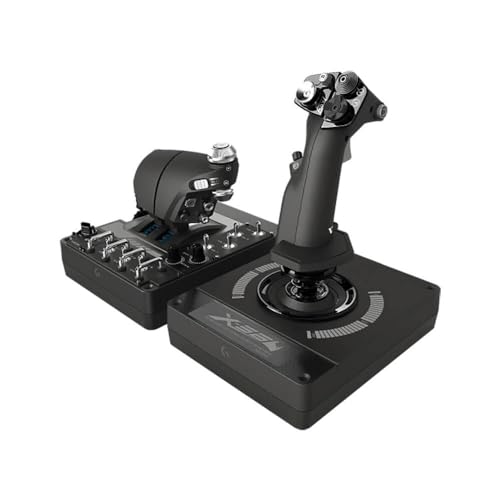
The Logitech X56 H.O.T.A.S combines military-grade precision with extensive customization. It features multiple control surfaces and 189 programmable controls to tailor flight profiles for space combat or exploration. The setup supports Windows 11/10/8.1/7 and includes a dual-USB design for stable, plug-and-play integration. Its RGB backlighting can be synchronized with other gaming peripherals for a cohesive rig aesthetic. The X56 supports separate control over pitch, roll, yaw, and weapon systems, enabling intricate flight deck management during intense space battles.
Thrustmaster T-Flight Hotas One

Designed for Microsoft Flight Simulator 2025, the T-Flight HOTAS One is officially licensed for Xbox Series X|S and PC. It offers high-precision control with 10-bit accuracy and five axes, including a Z-axis rudder. A rapid trigger and 14 action buttons provide essential in-flight commands, while the multidirectional hat switch aids navigation and target acquisition. The detachable throttle supports flexible setups, letting the stick and throttle be used together or separately for cockpit or desk configurations. This makes it a versatile option for both space flight and broader home flight simulators.
Turtle Beach VelocityOne Flightstick

The VelocityOne Flightstick emphasizes high-precision, non-contact main axes for smooth, consistent input. It combines a multi-function throttle and flap levers with robust compatibility for Xbox Series X|S, Xbox One, and Windows PC. This layout suits space and combat simulations that require precise control surfaces and throttle management in tight dogfights or orbital maneuvers. The device integrates into broader VelocityOne ecosystems, enabling cohesive control across multiple peripherals.
Buying Guide: Key Considerations For Choosing A Space Sim Joystick
- Precision technology: Hall Effect or magnetic sensors tend to offer superior accuracy and longer lifespans compared with standard potentiometer-based sticks.
- Ambidextrous design: If you switch between left- and right-handed play, look for detachable grips or modular components.
- Button layout and availability: More action buttons and programmable controls support complex flight profiles without excessive hand movement.
- Programmable software: A robust companion app allows mapping, macros, and lighting customization to match your ship’s systems.
- Throttles and axis control: Detachable throttles enable flexible setups, from cockpit-style arrangements to desktop configurations.
- Compatibility: Verify PC support (Windows versions) and console compatibility if you plan to use the device with Xbox or other systems.
- Build quality and ergonomics: Grip comfort, weight, and balance influence long sessions, especially during extended campaigns.
- Expansion potential: Some ecosystems support additional controllers (throttles, pedals, extra sticks) to build a full simulator rig over time.
When selecting, consider your primary use case: hands-on starfighter combat may reward multiple action buttons and precise axis control; exploration and docking can benefit from smooth throttle management and stable calibration. For multi-platform players, prioritize devices with strong PC support and official console compatibility. Finally, check for software updates and driver support to ensure continued performance as new game titles release.