Best Arcade Joystick for PC and Consoles: Top Picks for 2026
Looking to add authentic arcade action to your PC gaming setup? This guide highlights top arcade sticks that work with Windows, macOS, Linux, and popular consoles. Each pick offers solid build quality, customization options, and reliable compatibility. Read on to compare features, connectivity, and a few considerations to help you choose the right stick for fighting games, retro titles, or hybrid play.
| Product | Brand | Highlights |
|---|---|---|
| MAYFLASH F300 Arcade Fight Stick | MAYFLASH Store | Cross‑platform, supports XINPUT and DINPUT |
| 8Bitdo Arcade Stick | 8Bitdo Store | Wireless Bluetooth, 2.4G, customizable macros |
| Sehawei Haute42 Arcade Stick 16Keys | Sehawei Store | Hot swap, RGB, SOCD, keyboard-like layout |
| HORI Fighting Stick Mini | HORI Store | Officially licensed, compact, portable |
| SPEEDLINK Competition Pro | — | Nostalgic design, USB for PC and Android |
MAYFLASH F300 Arcade Fight Stick Joystick For Multiple Platforms
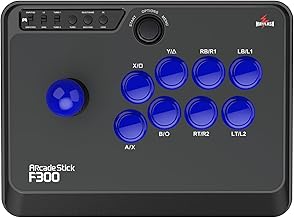
The MAYFLASH F300 is designed for broad compatibility, making it a versatile choice for a mixed gaming setup. It supports Switch and Switch 2, PS4, PS3, Xbox Series S/X, Xbox One, Xbox 360, PC Windows, macOS, Steam Deck, and Android. The construction centers on compatibility with Sanwa Denshi components, known for crisp, reliable input. It also offers XINPUT and DINPUT support when used on PC, easing setup across Windows and other operating systems. This stick targets players who value customization and cross‑platform play.
8Bitdo Arcade Stick For Switch & Windows

The 8Bitdo Arcade Stick provides flexibility for Switch and Windows, with wireless Bluetooth, a 2.4G receiver, and wired connection. It supports ultimate software for button mapping and macro creation, making it suitable for fighters and retro titles alike. A dynamic button layout means mappings can change with mode, offering a visually intuitive experience during combat. This stick emphasizes convenience and customization for multi‑device play and evolving control schemes.
Sehawei Haute42 Arcade Keyboard Controller

The Sehawei Haute42 blends arcade controls with a keyboard-style layout that includes 16 keys and backlit RGB. It supports a wide range of platforms, including Windows, Steam Deck, PS3, PS4, Switch, and various Linux and Android ecosystems. The controller emphasizes hot swap capability and a DIY vibe, allowing users to customize keycaps and skins. Its firmware options enable updates, while its extended port supports additional features without relying solely on the main console connection.
HORI Fighting Stick Mini For PS5, PS4, And PC

The HORI Fighting Stick Mini delivers a compact, officially licensed option for PS5, PS4, and PC. It features an 8‑button layout and an 8ft cable, balancing portability with performance. Its small footprint makes it ideal for on‑the‑go setups or dense arcade cab rotations, while still providing solid input response for fighters and retro titles alike. The stick is designed to appeal to players seeking a legitimate licensing badge and a space‑efficient option.
SPEEDLINK Competition Pro Extra USB Joystick

This Speedlink model channels a classic arcade aesthetic with a digital USB joystick suited for PC and Android devices. It targets arcade and retro game fans who want a nostalgic experience, with a design reminiscent of traditional competition pro sticks. The USB interface ensures straightforward plug‑and‑play setup for a variety of devices, making it a reliable option for casual fighters, beat ‘em ups, and emulation on the go.
Buying Guide: Key Purchase Considerations
- Platform compatibility: Confirm cross‑platform support (PC, Mac, Switch, PS5/PS4, Xbox) and whether the stick supports XINPUT/DINPUT on Windows for broad game compatibility.
- Input hardware: Look for Sanwa or similar premium joystick and button options for precise, consistent inputs. Consider build quality, button life, and tactile feedback.
- Connectivity: Decide between wired, wireless, or hybrid models. Wireless can add comfort and flexibility but may require pairing considerations and potential input latency.
- Customization: If you enjoy tailoring controls, prioritize sticks with programmable buttons, macro support, hot swap capabilities, or firmware updates for ongoing improvements.
- Form factor and portability: Smaller sticks are easier to transport but may feel cramped for long sessions. Larger sticks offer more hand comfort and a traditional arcade feel.
- SOCD and latency: For fighting games, ensure SOCD handling is clear and low latency is advertised or measurable to minimize input delay during fast exchanges.
- Maintenance and upgrades: Consider whether the stick is designed for easy part replacements, such as swapping joysticks or buttons without soldering, and whether the vendor provides compatible components.
- Software ecosystem: If a stick supports PC/mac software, evaluate the depth of customization, ease of use, and whether macros and button mappings persist across games.
- Space and cable management: Plan for adequate desk space and cable routing, especially for wired setups to avoid tangling during play.
Across these options, users should align their choice with play style (fighters, shooters, or retro emulation), preferred platform, and whether portability or customization takes precedence. Each model in this guide presents a distinct balance of compatibility, feel, and upgrade potential to accommodate diverse arcade and PC gaming needs.