Best Arcade Stick Buttons for Your Custom Controller
Whether building a retro arcade cabinet or upgrading a DIY fighting stick, choosing the right arcade stick buttons is essential for speed, feel, and durability. This guide highlights top 30mm and 24mm buttons from trusted brands, covering life span, tactile feedback, and compatibility with common fight sticks and PC setups. Each option below includes key features to help you compare style, function, and value for a responsive, arcade-grade experience.
| Product | Brand | Key Feature | Travel/Life |
|---|---|---|---|
| SANWA 8 pcs OBSF-30 | SANWA | Original Japanese quality, snap-in; smooth, quiet | 3,000,000 presses |
| EG STARTS Arcade Buttons 1 Player Kit | EG STARTS | LED illuminated, 5V; reliable cycles | 1,000,000 cycles |
| Qanba Gravity KS 30mm | qanba | Mechanical shaft, high lifetime | 70,000,000 lifetime |
| EG STARTS OEM 12x 30mm | EG STARTS | Includes microswitch; fits many sticks | Not specified |
| Hikig 2 Player LED Kit | Hikig | 2-player kit; USB encoder; LED lighting | Not specified |
Sanwa OBSF-30 8-Piece Push Buttons

The SANWA 8-piece OBSF-30 set delivers original Japanese quality with snap-in installation for quick replacements in most Hori and Mad Catz joysticks. These 30mm buttons offer smooth, responsive action with quiet operation and a claimed 3,000,000 life cycle, making them a staple for arcade cabinets and DIY sticks. They are designed for easy integration into custom controllers and provide reliable performance for fighting games and retro titles alike.
EG STARTS 1-Player LED Button Kit
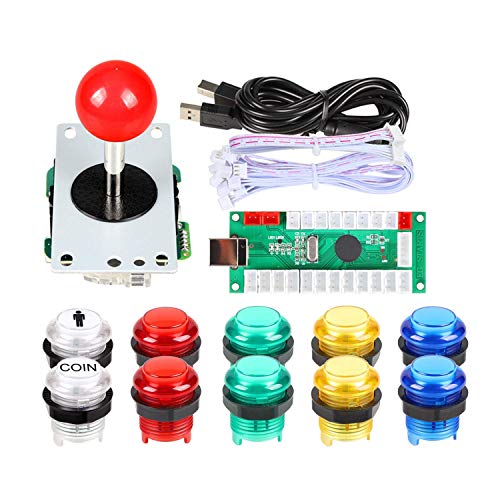
This EG STARTS DIY kit includes 5V LED arcade buttons and an 8-way joystick, optimized for PC game emulation and Raspberry Pi setups. It features durable LED illumination for enhanced visibility in dim rooms and reliable microswitch performance. Built for long life with tested cycle durability, it supports simple integration into custom sticks and MAME projects, appealing to enthusiasts seeking a complete illuminated control surface.
Qanba Gravity KS 30mm Mechanical Buttons

QANBA Gravity KS 30mm buttons use a mechanical shaft and a very high lifetime rating. With 0.8 mm pre-travel and 2.8 mm total travel, these 30mm buttons provide a crisp, tactile click and a long service life suitable for heavy use. They are designed to work with standard arcade joystick assemblies and are a solid upgrade for players seeking consistent, precise inputs in fighting games and rhythm titles.
EG STARTS OEM 12x 30mm Push Buttons

This EG STARTS kit provides 12x 30mm arcade buttons with microswitches included, designed to fit most Hori and Mad Catz sticks. The kit emphasizes arcade-grade quality with reliable click and feel, making it ideal for DIY fighting sticks or cabinet builds. Color variety and fast, straightforward installation help streamline customization projects for gamers and hobbyists alike.
Hikig LED Arcade Button Kit (2-Player)

The Hikig two-player kit combines 20 LED-lit arcade buttons with two joysticks and a zero-delay USB encoder, delivering instant input recognition on Windows systems. The kit is designed for MAME and Raspberry Pi setups, helping users create responsive, modern arcade experiences with vibrant illumination. This option suits those who want a complete DIY project with built-in lighting for a striking display and smooth performance.
EG STARTS 24mm OEM Arcade Push Buttons

These 24mm EG STARTS buttons are designed as arcade-quality replacements, featuring microswitches inside and compatibility with many Hori and Mad Catz joysticks. While slightly smaller than the 30mm options, they offer precise actuation and reliable cycling, making them a good fit for compact or retro-inspired fight sticks that require a tighter button layout.
Buying Guide: Key Purchase Considerations
When selecting arcade stick buttons, consider button diameter (24mm vs 30mm), actuation feel, life cycle, and compatibility with your joystick shell. 30mm buttons are standard for many fight sticks, offering a satisfying click and bold presence, while 24mm buttons are a solid choice for tighter layouts or compact builds. Look for microswitches with proven durability and a high cycle rating to ensure longevity under competitive play. LED illumination adds visibility in low-light setups but may require a compatible encoder or controller. Finally, ensure the buttons fit your existing housing or enclosure to avoid modification work and ensure a clean build.
Choosing Between LED vs. Non-LED
LED buttons provide enhanced aesthetics and visibility at the cabinet or desk, particularly in darker rooms. They typically require a 5V supply and a compatible wiring setup, which is common in DIY arcade kits. Non-LED buttons are simpler, often cheaper, and may reduce wiring complexity for straightforward builds. Decide based on your display goals, lighting conditions, and comfort with electronics wiring.
Durability and Life Span
Life cycle ratings indicate how many presses a button is expected to withstand. High-quality brands like Sanwa and Qanba often advertise multi-million press cycles, which is important for arcade and competitive gaming. If you anticipate heavy use from multiple players, prioritize higher life cycle specs to minimize maintenance and replacements.
Compatibility and Installation
Verify that the button diameter, mounting hole size, and chassis compatibility align with your joystick or cabinet. Snap-in or screw-in installation methods affect ease of replacement and stability. In most cases, 30mm buttons fit standard arcade enclosures, while 24mm options suit slimmer layouts or original hardware replacements. Consider whether you need additional adapters or a new wiring harness to integrate with your encoder.