Best Button Box for Sim Racing to Elevate Your Drive
For sim racers aiming to simplify cockpit control and gain a competitive edge, a button box offers fast, tactile access to essential functions. This guide reviews five top options suitable for PC racing sims, from mainstream titles like Assetto Corsa and iRacing to trucking and farming simulators. Each product focuses on programmable buttons, robust construction, and easy mounting to fit diverse rigs. Explore how these units perform in real-world setups and what to consider when choosing your next upgrade.
| Product | Key Feature | Best For |
|---|---|---|
| PXN CB1 Gaming Button Box | 30 programmable buttons, RGB backlight | Broad sim support and easy mounting |
| MiYee Sim Racing Button Box | Full-metal housing, 10 CNC buttons, 6 encoders | Durable build with premium feel |
| PXN Multi-functional CB1 | 30 programmable buttons, 7 RGB lighting effects | Customizable lighting and controls |
| ASETEK La Prima GT Button Box | Customizable inputs, anti-flex metal spider | Rigid, race-ready interface |
| PXN Farm Simulation Controller | 30 programmable buttons, RGB with color control | Agricultural and truck simulators |
Introduction
Choosing the right button box depends on how you race, your existing hardware, and the level of customization you require. The following five products stand out for American readers seeking reliable PC-based sim racing controls that feel responsive during sprint laps and long endurance sessions alike. Each entry provides a concise overview of compatibility, programmability, and installation options to help you compare quickly.
PXN CB1 Gaming Button Box – Sim Drive Control

The PXN CB1 Racing Button Box offers wide compatibility with PC gaming and popular simulators, including Assetto Corsa, iRacing, and Euro Truck Simulator 2. It supports 30 programmable buttons, enabling you to map gear shifts, menus, and complex commands to a single panel. The device mounts on desks, monitor stands, or surfaces up to 7 cm thick, making it adaptable to diverse rigs. RGB backlighting enhances visibility in dim cockpits, while plug-and-play setup reduces installation time.
MiYee Sim Racing Button Box

The MiYee button box features a durable carbon fiber face plate with a full-metal unibody. It is driver-free and plug-and-play, ensuring quick setup across multiple game titles. It includes 10 full-metal CNC-machined buttons with backlight, 3 premium self-locking metal toggles, a dedicated Start button, and 6 programmable rotary encoders. This combination provides a premium, tactile experience suitable for serious sim racing enthusiasts seeking reliability and longevity.
PXN CB1 Multi-functional Button Box

This PXN CB1 variant emphasizes broad compatibility across farming, trucking, and racing sims. It supports PC, the PXN V9 GEN2 wheel, and a wide range of titles including Assetto Corsa and American Truck Simulator. The 30 programmable buttons let you tailor control schemes to personal preferences, with a color-changing RGB palette that can be adjusted for ambiance and readability during late-night sessions. The installation remains straightforward, designed to bolt onto desks or compatible mounting points.
ASETEK La Prima GT Button Box
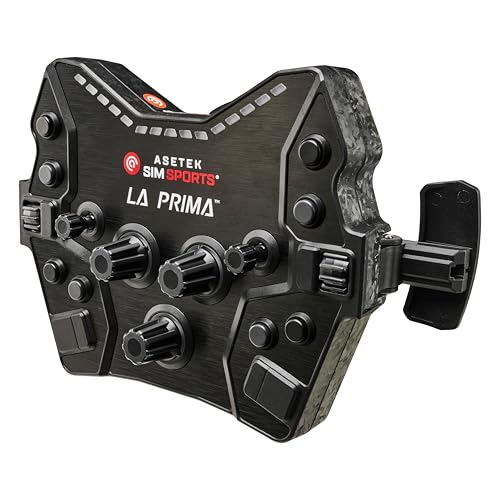
The ASETEK La Prima GT Button Box focuses on customizable inputs, including programmable buttons, switches, and encoders. Anti-flex metal spider construction provides a rigid connection with your chosen steering wheel rim, promoting a direct-drive feel without flex. It supports versatile pairing with various wheel rims to create a tailored racing setup. The design emphasizes precision and consistent performance essential for racing simulations demanding consistent input feedback.
PXN CB1 Racing Button Box PC USB
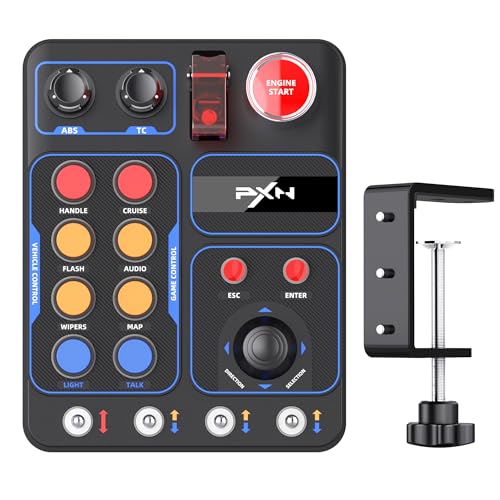
This PXN CB1 model aligns with a wide range of simulators and wheels, including Assetto Corsa, iRacing, and Euro Truck Simulator 2. It offers 30 programmable buttons with robust metal contact points for reliable wear resistance. The installation is straightforward and can be mounted on desks or surfaces up to 7 cm thick, enabling flexible positioning for different cockpit layouts. The device promotes enhanced control across multiple racing scenarios and vehicle types.
ASETEK Forte GT Button Box

The ASETEK Forte GT Button Box emphasizes interchangeable rims and quick-release compatibility for a flexible racing setup. It provides a robust control interface with high precision and customization, designed to withstand demanding racing conditions. The quick-release mechanism addresses ease of maintenance and swap-ability, enabling racers to adapt their cockpit quickly between different racing styles or wheel configurations.
ASETEK Forte GT Button Box
Note: This entry reiterates Forte GT as a robust option with versatile configurations and durable build. It supports multiple wheel rims, a quick-release system, and a sturdy design intended to deliver reliable button response during high-intensity races. Users should balance the need for customization with installation options that fit their cockpit space and wheel base compatibility.
Buying Guide
- Compatibility: Verify PC support and whether the button box works with your wheel base and favorite simulators. Some units specify compatibility with PXN wheels or broad PC game titles, which can influence setup time and functionality.
- Programmable buttons: Consider how many programmable keys you need (30 is common) and whether you require rotary encoders, toggles, or dedicated Start/Reset controls for realistic driving scenarios.
- Mounting and space: Assess desk or cockpit space and the maximum thickness the mounting plate will accommodate. Some models offer multiple mounting options, including monitor stands or desk legs.
- Lighting and visibility: RGB backlighting improves readability in dim cockpits. Check if color and brightness are adjustable to match your rig’s lighting scheme.
- Build quality: Look for metal housings and rigid construction to ensure durability under repeated throttle, brake, and climate changes inside long sessions.
- Installation ease: Driver-free plug-and-play setups reduce setup time. If you prefer minimal software requirements, prioritize models advertised as driver-free or with simple configuration software.
- Future expansion: If you plan to expand your cockpit with more devices, prioritize button boxes that offer consistent key mappings and a standardized interface for quick integration.
- Use case: For farming or trucking sims, ensure the box supports specialized functions like dedicated cruise control, wipers, or steering-related toggles that mirror real-world driving.