Best Coding Robots for 5-Year-Olds: Fun, Safe Learning Tools
Finding a beginner-friendly coding robot for a five-year-old can open doors to critical thinking, problem solving, and early STEM confidence. The following selections emphasize hands-on play, screen-free options, and gentle introductions to programming concepts. Each choice focuses on age-appropriate activities, clear instructions, and engaging feedback to keep youngsters excited about learning.
| Product | Age Range | Learning Focus |
|---|---|---|
| MBot Robot Kit | 8–12 | Block-based coding, sensors, basic robotics |
| Cooper the STEM Robot | 5–8 | Screen-free coding, hands-on exploration |
| Ruko 6088 | 3–6 | Gesture sensing, remote control basics |
| okk Robot Building Toys | 6–12 | Remote/app control, STEM building |
| ELEGOO Conqueror | 8–12 | Arduino-based coding, DIY construction |
Best Starter Kit With Scratch Coding

The Makeblock mBot kit is designed to make coding approachable through block-based Scratch-style tutorials and simple projects. It emphasizes a gentle ramp from physical assembly to digital control, helping young learners see how motions, sensors, and feedback connect. The included projects cover line following, obstacle avoidance, and remote control, offering tangible outcomes that reinforce newly learned concepts. This structure supports early confidence as children celebrate each small achievement while building a foundation for more advanced programming later on.
Screen-Free Coding For Curious Minds

Learning Resources Cooper the STEM Robot emphasizes screen-free coding with physical buttons and 40 coding cards. Its four interactive play modes (line tracking, optical sensing, obstacle avoidance, and robot-to-robot communication) promote critical thinking and problem-solving without screens. The USB-C charging option adds convenience for regular practice sessions, ensuring the robot is ready for learning whenever curiosity strikes. This option is well-suited for parents seeking calm, focused STEM play that translates into classroom-ready concepts without screen time.
Gesture-Sensing, Fun-To-Play Robot

The Ruko 6088 introduces gesture sensing and infrared remote control, allowing kids to guide the robot through simple movements with hand motions. With up to 50 motion combinations, children can explore sequencing and memory in a playful context. The one-key demo dance and song feature adds an entertaining element that can spark further curiosity, while the gesture control keeps the experience intuitive and tactile for younger learners who benefit from physical interaction.
Remote & App-Controlled STEM Kit

The okk robot kit blends construction play with remote and app-based control. Its modular design, servo motors, and gear movement system support hands-on assembly and subsequent programming exploration. The app enables multiple control modes—path, voice control, gyro, and stem programming—making it possible to scale challenges as a child grows. This kit suits families who want a robust platform that grows with their child’s developing engineering curiosity.
Arduino-Style Kit For Young Builders
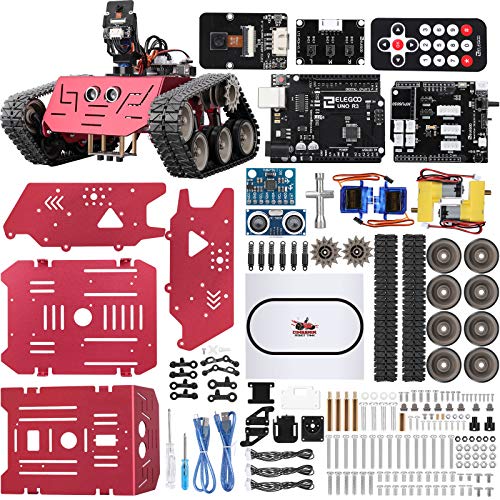
The ELEGOO Conqueror Tank Kit centers on Arduino-based learning and open resources. Kids assemble the chassis and explore graphical programming alongside tangible hardware. The kit emphasizes concentration and hands-on skills, with a strong focus on building confidence through DIY projects. The combination of building, coding, and creativity makes it a compelling option for older preschoolers who are ready to move from play to structured problem solving.
Buying Guide: Key Purchase Considerations
- Age suitability and safety: Choose kits designed for early learners with larger pieces, rounded edges, and no small parts that could pose choking hazards.
- Screen time balance: Consider options that emphasize hands-on building and offline coding to support attention and fine motor development.
- Learning progression: Look for products that offer a clear path from simple to more complex tasks, so a child can grow without needing a new device or system.
- Typing and motor skills: Some robots encourage pushing, turning, and assembling, helping develop hand-eye coordination and spatial reasoning.
- Expandability: Kits with modular components or compatible apps allow future upgrades as skills advance.
- Interest alignment: If a child shows interest in drawing, music, or motion, pick a robot that can engage those themes through activities like gesture control, drawing recognition, or dance routines.
Buying Guide: Key Comparisons
- Screen-free vs. app-based: Screen-free options reduce screen time while building logic through physical play; app-enabled kits provide more programming depth for later stages.
- Construction vs. prebuilt: Some kits are snap-tits with gears and sensors, while others arrive as ready-to-run units. Choose based on a child’s interest in building vs. immediate play.
- Programming approach: Look for block-based or graphic programming first. As skills advance, consider kits that introduce text-based coding or Arduino-compatible environments.
- Durability and maintenance: Reusable components, rechargeable batteries, and easy-to-clean surfaces extend playtime and value.
- Support and resources: A robust set of tutorials, safety guides, and age-appropriate challenges helps caregivers facilitate learning without frustration.