Best Computer Building Kits for Kids and Teens to Learn Coding and Electronics
Introducing hands-on computer building kits helps young learners explore coding, electronics, and robotics through play. This guide features five accessible kits that balance fun with real STEM instruction, making it easier for parents and educators to pick a gift that sparks curiosity, critical thinking, and hands-on problem solving.
The following table lists the selected products, highlighting what each offers for beginner to intermediate coders and builders. Use it as a quick reference when choosing the right kit for your child’s age and interests.
| Product | Brand | Key Focus |
|---|---|---|
| Base Kit Computer Coding Game | Let’s Start Coding | Real C++ coding, 60+ projects, guided videos |
| Playz My First Coding & Computer Science Kit | Playz | Binary, encryption, algorithms, puzzle activities |
| Makeblock mBot Robot Kit | Makeblock | Scratch to Arduino, robotics basics, remote play |
| Teach Tech Hydrobot Arm Kit | TEACH TECH | Hydraulics, real working robot arm, no batteries |
| Learning Resources Botley the Coding Robot | Learning Resources | Screen-free coding, age 5+ with step challenges |
Base Kit Computer Coding Game For Kids
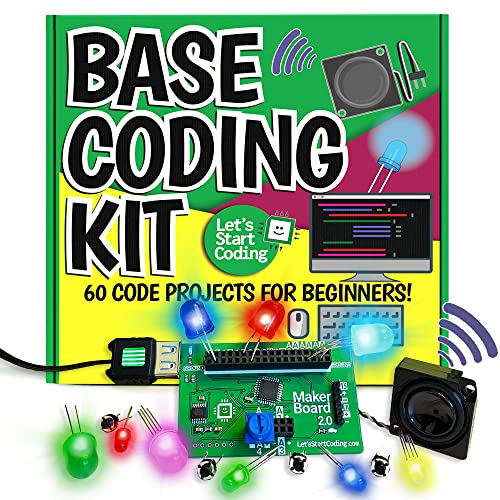
The Base Kit from Let’s Start Coding introduces foundational programming concepts through engaging projects and guided video walkthroughs. It targets ages 8 and up, helping tweens and teens gain confidence with C++ coding, circuits, and real-world logic. The kit emphasizes self-paced learning, with more than 60 projects and 3.5 hours of instructional video. Hands-on activities provide immediate feedback, reinforcing problem-solving and critical thinking as students tinker with code and hardware.
Key features include a guided path from basic to advanced projects, a tangible circuit board for practical understanding, and an emphasis on measurable progress. It’s designed as a solid beginner-to-intermediate entry point for families seeking a structured, packable STEM gift that blends software with hardware.
Playz My First Coding & Computer Science Kit

This kit invites younger coders into computer science through binary concepts, encryption, and puzzle-based activities—without requiring a computer for initial exploration. It offers a playful gateway to topics such as binary codes, algorithms, and pixel art, while including a substantial parts kit and an illustrated guide. The program is suitable for kids aged 6 and up, making it a flexible option for early STEM exposure and classroom activities. The activities promote hands-on learning and curiosity about how information is organized and manipulated.
As a value-forward option, Playz emphasizes clear, colorful instructions and age-appropriate challenges. It supports independent exploration or guided group projects, helping young learners build confidence as they master foundational CS ideas through tangible tasks and visual reasoning.
Makeblock mBot Robot Kit

The mBot robot kit from Makeblock focuses on foundational robotics using Scratch and Arduino. Ideal for ages 8–12, it guides learners from block-based programming to text-based coding as their skills grow. Assembly is straightforward, typically doable within 15 minutes, and the kit supports various remote-control and autonomous functions like line-following and obstacle avoidance. The bundled tutorials and apps provide a structured learning path, making it a dependable option for classrooms or family STEM sessions.
With multiple software options and clear modular components, mBot encourages ongoing experimentation. Kids can expand projects using additional Makeblock apps and modules, fostering creativity while reinforcing electronics basics, sensors, motors, and robotic systems concepts in a hands-on environment.
Makeblock Cyberpi Project-Based Kit

The Makeblock Cyberpi kit is a robust all-in-one learning platform designed to bridge Scratch and Python. It provides a built-in microcomputer with sensors, LED displays, and wireless connectivity, enabling projects in data science, IoT, AI, and robotics. Learners start with Scratch-style visual coding and transition to Python as they gain familiarity and confidence. The kit includes a rechargeable battery and expansion options, supporting ongoing hands-on projects that integrate hardware with software in a practical, project-based framework.
Built for flexibility, Cyberpi encourages students to prototype video games, voice-control projects, and IoT devices, while exploring AI concepts and simple networks. This kit is well-suited for motivated learners who want a more advanced challenge without stepping outside a guided, beginner-friendly pathway.
Learning Resources Botley the Coding Robot

Botley the Coding Robot offers a screen-free approach to early programming concepts. Designed for ages 5 and up, Botley introduces loops, sequence, and conditional logic through physical coding challenges. Its 80-step programming features, along with obstacle detection and expandable activities, provide a scalable learning curve that grows with the child. The kit emphasizes independent play and group activities, making it suitable for classroom use or home learning. It’s an accessible entry point that builds confidence before transitioning to more complex coding environments.
With simple remote controls and a dependable battery setup, Botley keeps the focus on fundamental algorithmic thinking and pattern recognition, helping children internalize computational thinking without screens or devices at the outset.
Buying Guide: Key Purchase Considerations
Selecting the right computer-building kit for kids involves balancing age, interests, and learning pace. Consider the following perspectives to ensure a strong fit:
- Age and learning progression: Start with screen-free or visually guided options for younger children, then transition to Scratch, Arduino, or Python as skills mature.
- Hardware and software integration: Look for kits that combine hardware components with engaging software or guided videos, so kids see a direct link between code and real-world results.
- Project variety and depth: Prefer kits offering a clear progression path—multiple projects, tutorials, and challenges that scale in complexity to sustain interest.
- Hands-on vs. screen time: Balanced kits that mix hands-on assembly with coding guidance tend to reinforce learning more effectively than products focused on a single modality.
- Safety, durability, and future-proofing: Choose robust components and modular kits that can be upgraded with additional modules, sensors, or software updates as kids advance.
- Community and support: Kits with active tutorials, forums, and customer support can help resolve questions quickly and keep kids engaged over time.
- Cost and value: Consider total project potential, not just initial price. A kit with more projects and expandability often yields greater long-term value.
To maximize outcomes, pair kits with a structured learning plan. Allocate regular, short practice sessions, encourage journaling of coding experiments, and integrate mini goals to celebrate milestones. For classrooms, combine kits with collaborative projects to develop teamwork, debugging strategies, and system thinking.