Best Kids Robots for Learning and Fun in 2026
Discover the best kids’ robots that blend learning, creativity, and play. From interactive drawing bots to AI-powered companions, these picks help children explore STEM skills, coding basics, and imaginative storytelling. Each option is designed to be engaging, safe, and age-appropriate for growing minds. The following selections emphasize hands-on learning, clear guidance, and diverse play modes to suit different interests and ages.
| Product | Brand | Ideal Age Range |
|---|---|---|
| Dan&Darci Scribbly The Drawing Robot | Dan&Darci | 5–7 |
| Ruko 1088 Smart Robots | Ruko | 4–9 |
| Miko 3 AI Robot | Miko My Companion | 5–10 |
| Elenco Teach Tech Zivko Robot | Elenco | 10+ |
| KingsDragon RC Robot | KingsDragon | 3–8 |
Choosing the right robot depends on a mix of curiosity, safety, and long-term engagement. Below are five strong options that cover drawing and creativity, programmable behavior, AI storytelling, and interactive play. Each product section includes a concise description, notable features, and how it supports development in early STEM, problem-solving, and language skills.
Dan&Darci Scribbly Drawing Robot
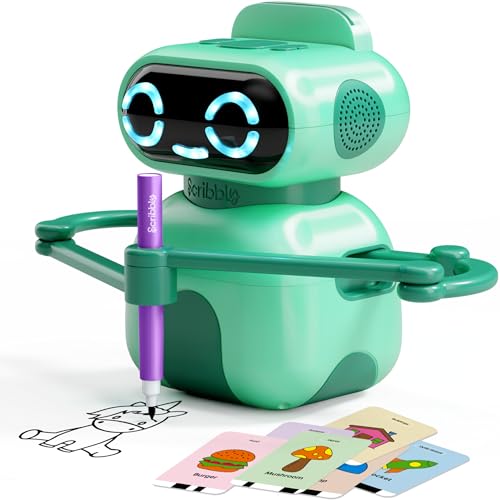
Scribbly is an interactive drawing robot designed to guide kids through step-by-step drawing with voice instructions. The device speaks and coaches each stroke, turning a potentially tricky design into a progressive, confidence-building activity. This model emphasizes procedural learning, visual planning, and verbal guidance, making it ideal for children who enjoy art and hands-on tasks.
Key features include clear, stage-by-stage drawing prompts and a voice-guided coaching system. The emphasis on stepwise progression helps young artists translate ideas into lines, shapes, and color, reinforcing fine motor skills and sequencing. This robot is well-suited for ages 5 to 7, supporting both independent practice and collaborative drawing sessions with family or teachers.
Ruko 1088 Smart Robot for Kids

Ruko 1088 is a large programmable robot designed to grow with a child’s skills. Standing up to 15.8 inches tall, it offers multiple modes, including voice control, app control, and a variety of expressive actions. The robot’s movements and songs encourage exploratory programming, logic development, and creative storytelling. It makes a strong case for STEM learning by combining hardware with software-based programming concepts in a kid-friendly package.
Its features include expressive expression options, multiple joints for dynamic movement, and a suite of activities like gymnastics, storytelling, dance, and music. This versatility supports a broad range of interests—from pretend play to basic programming concepts—while fostering coordination and recall through repeated play sessions.
Miko 3 AI Robot for Kids
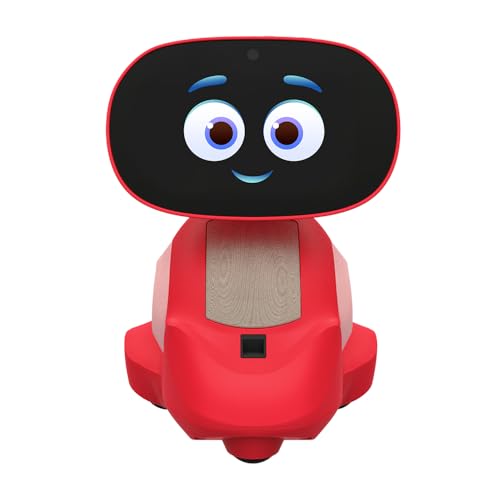
Miko 3 is an AI-powered robot designed for ages 5 to 10. It blends STEAM learning with interactive play through a built-in touchscreen, Story Maker adventures, and age-appropriate content. The robot adapts to a child’s preferences over time, offering a friendly, responsive personality that supports emotional growth and personalized learning. The Story Maker feature enables collaborative storytelling and memory-book creation, transforming screen time into a creative, shareable activity.
With a focus on independent exploration and guided activities, Miko 3 supports reading readiness, conversational skills, and basic problem-solving. Its adaptability makes it suitable for a range of developmental stages, helping kids stay engaged through personalized interactions and diverse content.
Elenco Teach Tech Zivko The Robot

Zivko is an AI-capable interactive robot designed for older kids (ages 10+). It introduces basic AI concepts through two modes—Follow and Explore—and includes infrared sensing to navigate environments. This robot emphasizes hands-on engineering and problem-solving, encouraging kids to experiment with autonomous movement and sensor-based interactions. The assembly-focused design reinforces sequencing, mechanical understanding, and early robotics principles for aspiring engineers.
The kit format promotes engineering mindset, while the AI features offer a gentle introduction to machine intelligence. Kids can explore cause-and-effect relationships as they program movements and responses, helping develop logical thinking and computational thinking foundations.
KingsDragon RC Robot for Kids

KingsDragon combines remote control functionality with gesture sensing to offer interactive play across multiple control modes. Kids can use an infrared controller or hand gestures to operate the robot, making it accessible to younger children while still providing programmable action options. The robot’s LED eyes add a playful visual cue when it moves, enhancing engagement and imagination. An extensive set of actions and a robust build make it suitable for active, creative play and early programming concepts.
Gesture-based control, routine playback, and obstacle avoidance introduce children to sequencing, cause-and-effect reasoning, and basic robotics behavior in a fun, approachable way. This option is well-suited for kids who enjoy action-packed play and hands-on exploration.
Buying Guide: What to Consider When Choosing a Kid-Friendly Robot
- Age and safety: Match the robot to the child’s age range and ensure age-appropriate features. Look for non-toxic materials, rounded edges, and parental controls if available.
- Learning goals: Define whether you want a device focused on art, storytelling, coding basics, or engineering concepts. Some robots emphasize creativity (Scribbly, Miko 3), while others prioritize programming (Ruko 1088, Elenco Zivko).
- Interaction style: Consider voice guidance, touch sensors, gesture control, and app-enabled control. Mixed modalities can sustain engagement and support different learning styles.
- Programming complexity: For younger kids, start with guided, step-by-step activities. For older kids, look for programmable actions, levels, and open-ended challenges to scale with skill growth.
- Storytelling and memory features: Story-driven robots like Miko 3 can enhance language and narrative skills, while memory or digital journaling features aid retention and family sharing.
- Durability and maintenance: Check battery life, charging time, and replacement part availability. Durable constructions help with frequent use and rough handling typical in kids’ play.
- Future-ready content: Some robots offer software updates, new activities, and learning modules to extend their usefulness as kids’ interests evolve.
- Price and value: Compare features against budget. A robot with growth paths (more activities, learning progression) can represent better long-term value than a basic model.
In selecting a kid-friendly robot, it helps to consider whether the child prefers drawing and art, storytelling, or hands-on engineering. Robots with guided prompts offer support for beginners, while programmable options encourage independent exploration. A mixed mix of features—artistic guidance, adaptive learning, and interactive play—tends to provide the broadest developmental benefits while keeping kids engaged over time.