Best Joystick Chair Mounts for Flight Sim Setup
For flight sim enthusiasts, a sturdy, ergonomically positioned joystick chair mount can transform the experience. The right mount keeps controls within easy reach, reduces desk clutter, and promotes better posture during long sessions. This guide reviews five top-rated chair mounts that work with popular flight sticks, throttles, and HOTAS systems, helping you choose the best fit for your setup. Below is a quick summary of the chosen products.
| Product | Brand | Key Benefit |
|---|---|---|
| EG STARTS 2 Set Chair Mount | EG STARTS | Excellent compatibility and adjustable height |
| EG STARTS 2 Pack Chair Mount Hotas Mount | EG STARTS | Wide adaptability for many HOTAS systems |
| EG STARTS Games Joystick/Hotas Chair Mount | EG STARTS | Directly attaches to most gaming chairs |
| Fosiya SIM Fighting Joystick Center Chair Mount | Fosiya | Heavy-duty stability and ergonomic design |
| Marada Flight Joystick Hotas Mount | Marada | 3-axis stability with high load capacity |
EG STARTS 2 Set Chair Mount Review

The EG STARTS 2 Set Chair Mount is designed to secure flight controls under a chair, offering compatibility with a wide range of devices such as X56, X52 Pro, T.16000M, and more. It emphasizes stability with a heavy-duty build and aims to keep the cockpit apparatus in an optimal position. Height adjustment up to 6 inches and outward tilt up to 45° support customized seating posture. This model focuses on a robust mount that minimizes desk clutter and provides a clean setup for flight sims.
Key features include robust compatibility with numerous HOTAS configurations, solid stability, and straightforward installation that fixes to the chair’s underside. The design targets a stable, tidy flight desk—beneficial for players seeking to prevent equipment drift during aggressive maneuvers. Ideal for users who want a one-mount solution that can accommodate many sticks and throttles without buying multiple mounts.
EG STARTS 2 Pack Chair Mount Hotas Mount Overview

This pair of mounts expands compatibility across a broader set of HOTAS devices, including X56, X52 Pro, T.Flight HOTAS, and VKB setups. The mounts are designed to be installed under the chair, providing a stable base that holds gear firmly in place. The wide adaptability makes this option suitable for users who rotate between multiple control configurations or those who own several joysticks and throttles.
Construction emphasizes stability, with strong clamps and a design that minimizes wobble. The kit aims to deliver a comfortable control experience by positioning devices at the right height and distance from the user. It’s particularly appealing for players who want an efficient, single solution to accommodate various flight controls without sacrificing ergonomics.
EG STARTS Joystick/Hotas Chair Mount Features

This chair mount is designed to attach directly to most gaming chairs, simplifying the setup for many users. It supports a wide range of devices from Thrustmaster and Logitech to VKB and WinWing, offering flexible mounting options. The height and distance adjustments allow precise placement of both joystick and throttle units, enabling an ergonomic reach and comfortable control during long sessions.
With straightforward installation and broad device compatibility, this mount is suitable for players who want a quick, reliable way to integrate HOTAS into a chair-based setup. The design focuses on practicality and ease of use, making it a practical choice for both newcomers and seasoned sim pilots seeking a tidy, space-efficient cockpit environment.
Fosiya Center Joystick Chair Mount Overview

The Fosiya center chair mount emphasizes broad device support, including T-Flight Hotas 4, Warthog, T16000M, TCA Airbus, VKB Gunfighter Pro, and more. A notable feature is its load-bearing capability, supported by heavy-duty M8 screws for strong clamping force and stability up to 300 kg, ensuring that equipment stays securely in place during intense flights. The stand also offers adjustable vertical height and horizontal position, providing flexibility to tailor the setup to user preference.
Comfort and ergonomics are addressed through adjustable height and left-right positioning, allowing users to align controls with their seating posture. The combination of strong construction and adjustable ergonomics makes this mount suitable for players who prioritize durability and customizable control reach in a chair-based flight cockpit.
Marada Flight Joystick Hotas Mount Review
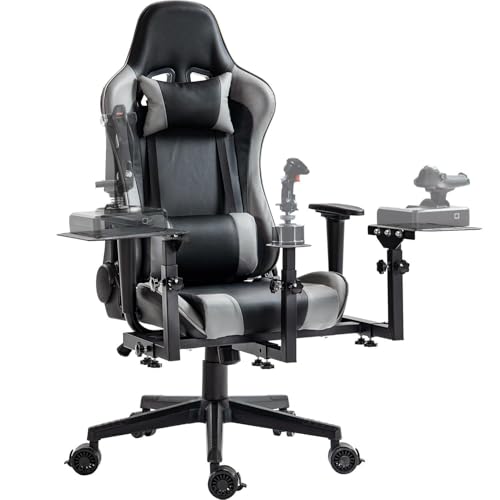
The Marada flight joystick mount is designed for a complete flight cockpit experience, integrating a center-of-gravity design to avoid tipping as you control a variety of devices. It supports axes and levers with a compatibility range similar to many standard HOTAS setups and can be paired with Thrustmaster, Logitech, and other major brands. The dedicated mounting system aims to provide stable operation with a backrest that can be adjusted, increasing comfort during long flights. It’s built to hold up to 300 pounds, with laser-welded steel construction and durable support rollers to maintain steady positioning.
For users seeking a cohesive flight station that can adapt to multiple devices and layouts, the Marada mount offers a balanced approach to stability, ergonomics, and compatibility. The focus on center-of-gravity stability makes it a strong option for those who frequently maneuver their controls during complex missions.
Buying Guide: Key Purchase Considerations
- Device compatibility: Verify that the mount supports your joystick, throttle, and HOTAS models, including any extensions or add-ons you use.
- Mounting method: Most chairs use under-seat mounting. Ensure your chair has space and structural integrity to handle clamps and screws without causing damage.
- Height and reach adjustability: Look for adjustable vertical height, depth, and horizontal tilt to match your seating position and cockpit layout.
- Weight capacity: Check the maximum load to ensure it accommodates your gear, especially if you use heavier controllers or multiple devices.
- Stability and build quality: Aluminum or steel frames with solid clamps reduce wobble during aggressive maneuvers and long sessions.
- Ease of installation: Consider mounts with straightforward assembly steps and clear instructions to minimize setup time.
- Ergonomics: A well-positioned mount reduces neck and shoulder strain, improving comfort and control accuracy over time.
- Future-proofing: If you anticipate upgrading controllers, choose a mount with broad compatibility and flexible mounting points.
- Cable management: Some mounts offer built-in channels or clips to keep cables tidy and prevent snagging.
Comparison At A Glance
- Best for broad compatibility: EG STARTS 2 Set Chair Mount and 2 Pack Chair Mount offer extensive device support across popular HOTAS systems.
- Best for stability: Fosiya Center Mount emphasizes high load capacity and adjustability for tight control in dynamic flight sim scenarios.
- Best for ergonomic customization: Marada provides center-of-gravity stability with a focus on comfortable seating integration.
When selecting a joystick chair mount, match your flight style, hardware, and space constraints. A well-chosen mount can reduce clutter, improve control precision, and help sustain comfortable, long-duration flights. Ensure the model fits your chair and control layout, then follow the included installation instructions for optimal performance.