Best Robot Building Kits for Kids: Top Picks for STEM Fun
Choosing a kid-friendly robot kit blends education with hands-on play. The following selections emphasize beginner-friendly assembly, engaging coding or simple AI concepts, and plenty of hands-on experimentation for ages 8–12 and early teens. Each kit focuses on building confidence in electronics, programming, and mechanical reasoning while offering safe, age-appropriate activities.
| Product | Brand | Highlights |
|---|---|---|
| ELEGOO UNO R3 Smart Robot Car Kit V4 | ELEGOO | Line tracing, obstacle avoidance, app control |
| Makeblock mBot Robot Kit | Makeblock | Scratch & Arduino learning, multi-function remote |
| Thames & Kosmos Kai: The Artificial Intelligence Robot | Thames & Kosmos | AI concepts, app-enabled, hands-on ML basics |
| Thames & Kosmos Kids First Robot Engineer | Thames & Kosmos | Non-motorized robots, story-guided build and learn |
| Learning Resources Botley the Coding Robot | Learning Resources | Screen-free coding, age-appropriate progression |
Note: Each kit offers a distinct learning pathway—from physical build and electronics to coding with or without screens—allowing parents to tailor playtime to a child’s interests and attention span.
ELEGOO UNO R3 Smart Robot Car Kit V4 for Arduino

The ELEGOO Smart Robot Car Kit is designed for beginners to gain hands-on experience with programming, electronics assembly, and robotics. It serves as an integrated learning solution for robotics education. The kit includes 24 module parts such as obstacle avoidance and line tracing modules and supports control via Android and iOS devices. Assembly is streamlined with XH2.54 interfaces to reduce errors, making it suitable for classrooms or at-home learning.
Makeblock mBot Robot Kit

The mBot kit targets entry-level coding by bridging Scratch and Arduino. It includes clear building instructions, allowing assembly in about 15 minutes. Children can explore electronics, machinery, and robotics components as they build, then use line-following and obstacle-avoidance modes as a remote-controlled car. The kit comes with extensive programming resources and apps, though batteries for the remote are not included, which encourages parental involvement. It emphasizes progressive learning from blocks-based coding to more advanced concepts.
Insnug Robot Building Set with Remote Control
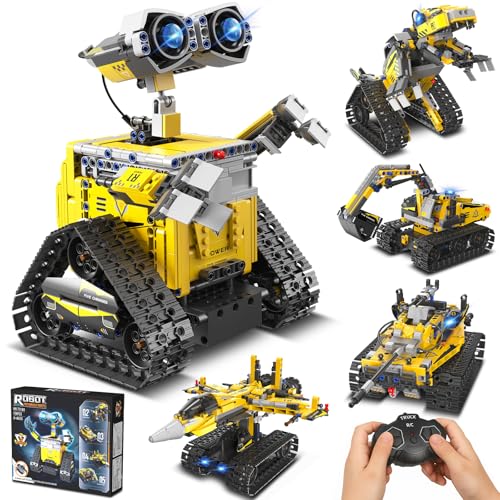
Insnug’s 5-in-1 kit provides a robust construction experience with 724 pieces to build a robot, a tank, a race car, an excavator, or a dinosaur. The 2.4GHz remote control enables hands-off demonstrations from up to 20 meters away, and many parts are articulated for dynamic play. This kit emphasizes creativity, engineering design, and motorized motion, supporting imaginative play while developing spatial reasoning and problem-solving skills.
Thames & Kosmos Kids First Robot Engineer

This STEM experiment kit is designed for young learners and focuses on building ten non-motorized robots. The play-and-learn format includes a storybook manual, making it accessible for preschoolers and early elementary students. Kids explore simple machines, gears, and wheels, building foundational engineering concepts through guided activities that pair narrative with hands-on assembly.
Learning Resources Botley the Coding Robot

Botley offers screen-free coding for younger learners, focusing on early programming fundamentals without tablets or smartphones. It’s designed to grow with a child, featuring 80-step programming capabilities, loops, and advanced obstacle detection to present increasing challenges. The kit is ready to use out of the box (requires batteries) and emphasizes immediate engagement through remote coding that older siblings can adore as well.
Buying Guide: Key Purchase Considerations
- Age appropriateness: Match complexity with a child’s cognitive development and attention span. Some kits like Botley emphasize screen-free learning for younger kids, while others introduce AI or Arduino-level concepts for older children.
- Learning path: Decide whether you want mechanical building, remote control, coding with Scratch/Arduino, or AI concepts. Some kits blend multiple pathways, offering longer-term engagement.
- Hardware vs. software balance: Kits with rich hardware (motors, sensors) require assembly and maintenance, while software-first kits focus on coding concepts and virtual simulations.
- Safety and durability: Look for non-toxic materials, robust plastic or metal parts, and clear safety guidelines, especially for younger builders.
- Expandability: Consider whether the kit supports additional sensors, modules, or future upgrades to grow with the child’s skills.
- Parent involvement: Some kits are designed for independent play; others benefit from parental guidance or classroom-style instruction to maximize learning outcomes.
- Availability of tutorials: Rich, step-by-step manuals and online tutorials help sustain interest and reduce setup frustration.
In selecting a kit for a child, it helps to identify whether the goal is to learn basic mechanics, practice coding, or explore AI concepts. Each product above offers a distinct route to building confidence in STEM while delivering a fun, hands-on experience.