Best Smart Boards for Preschool: Interactive Learning Tools
Finding the right smart board for preschool settings means balancing interactive technology with age-appropriate learning. The boards below highlight large-format touch displays, easy annotation, and classroom-friendly connectivity to support early literacy, math, and collaboration. Each option is suitable for small classrooms, home study spaces, or tutoring centers, helping young learners explore numbers, letters, and ideas through hands-on engagement. The selections emphasize durability, simple interfaces, and compatibility with multiple devices to fit diverse preschool environments.
Summary of chosen products
| Product | Brand | Type | Key Benefit |
|---|---|---|---|
| 65-Inch Smart Board | COOLHOOD | Interactive Whiteboard | 4K display, multi-touch, Android 13 |
| RAIZEA Smart Board 55 Inch | RAIZEA | Interactive Whiteboard | Android 11, 20-point touch, wireless sharing |
| 49-Inch Digital Interactive Smart Board | JYXCN | Interactive Whiteboard | Android OS, 5G-wifi, screen sharing |
| 75-Inch 4K Smart Board | NEWORK | Interactive Whiteboard | Android 14, Google EDLA-Certified, large display |
| Matching Game Alphabet | Chuckle & Roar | Educational Board Game | Preschool-friendly, durable tiles, group play |
RAIZEA Smart Board 55 Inch Interactive Whiteboard

The RAIZEA smart whiteboard combines Android-based operation with a multi-touch surface, supporting up to 20 touch points for collaborative activities. It is designed for home, classroom, and office use, with quick response times and wireless options for sharing content. This model emphasizes an all-in-one approach, blending a digital whiteboard, computer-like features, and screen sharing to support early literacy and basic math activities in preschool settings. It includes wall mounting and a user-friendly interface that suits educators seeking an integrated teaching tool.
COOLHOOD 65-Inch Smart Board

This 65-inch 4K interactive whiteboard from COOLHOOD offers a robust processor, 20-point multi-touch, and Android 13 with ample storage. The device supports interactive presentations, annotation tools, and wireless sharing, making it suitable for preschool classrooms or tutoring spaces that require large, engaging displays. While the stand is available separately, the wall-mount option keeps setup simple in tighter spaces. Its high-resolution screen helps keep preschoolers engaged during early literacy games, number tracing, and collaborative storytelling.
JYXCN 49-Inch Digital Interactive Smart Board
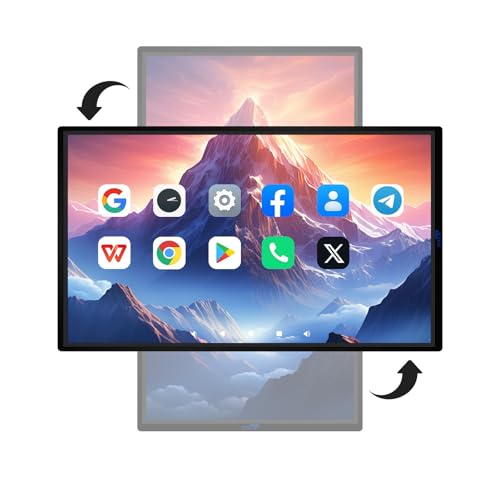
The JYXCN 49-inch board runs on Android with options for screen mirroring and wireless sharing. With 5G-wifi compatibility and a responsive touch surface, it supports multiple users for group activities, making it a practical option for preschools that want to blend digital storytelling with cooperative play. The board’s compact size fits smaller classrooms while still enabling interactive math games, handwriting practice, and collaborative lessons. The kit supports 10+ person simultaneous editing, offering flexibility for centers and small-group stations.
NEWORK 75 Inch 4K Smart Board

The NEWORK 75E smart board is Google EDLA-certified, runs Android 14 with 8 GB RAM and 64 GB ROM, and delivers a 4K display with a wide viewing angle. This combination supports immersive visuals for early reading activities, math demonstrations, and collaborative projects in preschool settings. The device emphasizes privacy, Google Play access, and regular OTA updates, helping schools keep content appropriate and up-to-date. Its large screen helps groups stay focused during shared lessons and interactive storytelling sessions.
Chuckle & Roar Alphabet Matching Game

While not a traditional smart board, this preschool-friendly matching game supports letter recognition and early phonics in a hands-on format. The durable tiles are designed for group play or solo practice, making it a complementary activity for preschool centers that pair screen-based learning with tactile tasks. It encourages focus, memory, and social interaction—key components in early childhood education.
Buying Guide: Key Purchase Considerations
- Display size and viewing distance: Preschool rooms benefit from large, bright displays that are easy to see from across the room. Choose 55–75 inches for most classrooms, with 4K or higher resolution for sharp text and images.
- Touch capabilities and latency: Look for multi-touch support (at least 10–20 points) with low input lag to support group activities, drawing, and collaborative tasks without frustration.
- Operating system and app ecosystem: Android-based boards offer broad app availability and intuitive interfaces for teachers. Certifications like Google EDLA can unlock access to classroom tools and security updates.
- Connectivity and compatibility: Wireless screen sharing, screen casting, and seamless cross-device compatibility (Mac, Windows, iOS, Android) simplify lesson planning and student participation.
- Durability and classroom features: Consider sturdy builds, stand options, wall-mount compatibility, and ease of cleaning. Some boards include annotation tools, timers, and voting features to facilitate interactive activities.
- Content management and storage: Devices with ample storage and cloud or local file-sharing support help teachers organize lesson plans, digital worksheets, and interactive activities.
- Price and space: Larger boards cost more, but smaller rooms benefit from compact models. Assess whether the classroom space and budget align with long-term use and potential expansions.
- Supplementary resources: Interactive boards pair well with physical learning tools (puzzles, alphabet tiles, tracing books) to provide balanced experiences that blend screen time with hands-on activities.
- Ease of maintenance: Check warranty terms, vendor support, and available accessories, such as stands or wall mounts, to ensure long-term usability in a preschool environment.