Best Tattoo Stencil Machines for Artists
Discover top-rated stencil printers designed for tattoo artists and hobbyists alike. This guide highlights five versatile devices that blend portability, wireless connectivity, and smart apps to streamline stencil creation. Each entry provides key features, device compatibility, and usage considerations to help you choose the best stencil machine for on-the-go sessions, studios, or beginners starting their tattoo journey.
| Product | Brand | Compatibility | Key Benefit |
|---|---|---|---|
| Phomemo M08F Tattoo Kit | Phomemo | Phone/Tablet/PC (Bluetooth & USB) | Lightweight, battery-powered, wireless |
| Phomemo M08F AI Edition | Phomemo | Phone/Tablet/PC | AI image generation and one-touch printing |
| Itari A886 | Itari | Phone/Tablet/PC | Beginner-friendly with wrinkle-resistant mode |
| Phomemo M08F Plus | Phomemo | Phone/Tablet/PC | Smart touchscreen and precise alignment |
| ATOMUS 116F | ATOMUS | USB/Power | Fast transfer with low noise |
Phomemo M08F Tattoo Kit

Phomemo M08F Tattoo Kit focuses on a lightweight, wireless design, weighing about 2 pounds. Its built-in battery enables mobile use without tethering to a charger. The device supports multiple systems, including Android, iOS, Windows, MacOS, and ChromeOS, via Bluetooth or USB connections. The accompanying Phomemo App enables one-click printing and a scanning function for tattoo designs. For best results, use Phomemo Tattoo Transfer Paper. This kit is tailored for both professional artists and beginners seeking convenient mobility without sacrificing print quality.
Phomemo M08F AI Edition

This edition emphasizes broad compatibility with smartphones, tablets, laptops, and desktops across Android, iOS, Windows, MacOS, and ChromeOS. It remains ultra-portable at about 2 pounds with a rechargeable battery for on-the-go use. The Phomemo App supports one-touch image printing and scanning specifically designed for tattoo designs, streamlining the workflow from concept to stencil. The AI-enabled features help generate and edit stencil designs efficiently, though functionality may require subscription for full AI capabilities.
Itari A886 Tattoo Stencil Printer Kit

The Itari A886 focuses on accessibility for beginners and portability, featuring wrinkle-resistant technology to keep transfer papers flat and printing crisp. The printer is designed for quick practice and professional use, with a monochrome output suited for line art. It’s ideal for travel-friendly setups such as trade shows or mobile services. An optional AI design feature expands design options, with a paid subscription offering, 3-day free trial, and monthly allotment of uses.
Phomemo M08F Plus Tattoo Printer

The M08F Plus adds a smart touchscreen for easier control, auto-shutdown, adjustable brightness, and built-in calibration. It continues to rely on thermal transfer technology with no ink required, and includes 10 transfer papers. Its USB and Bluetooth connectivity support a broad range of devices (Android, iOS, Windows, MacOS, and ChromeOS). The enhanced firmware improves detail and alignment consistency, making it suitable for professionals seeking precise output with a streamlined interface.
ATOMUS 116F Tattoo Transfer Printer
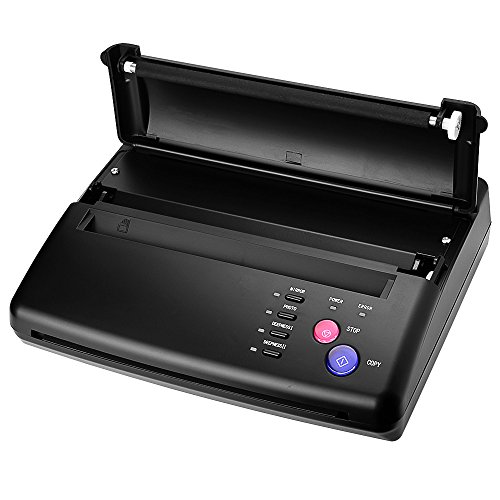
ATOMUS 116F emphasizes fast transfer speed with low heat and low noise. The package includes the tattoo thermal copier, power supply cable, and instruction book, offering a straightforward setup. It’s designed for quick, reliable stencil printing suitable for busy studios or mobile services. While not explicitly wireless, its compact form and efficient performance make it a practical choice for consistent stencil production in various environments.
Buying Guide
- Print quality and consistency: Look for high-resolution stencil output, wrinkle resistance, and alignment calibration to reduce misprints.
- Portability: Consider weight, battery life, and whether the device is truly wireless for on-the-go tattooing.
- Device compatibility: Ensure the printer partners smoothly with your preferred devices (Android, iOS, Windows, MacOS, or ChromeOS) via Bluetooth or USB.
- App and software features: Apps with image editing, AI design options, and large design libraries can speed up workflow, but confirm whether premium features require a subscription.
- Support and supplies: Check availability of transfer papers and accessories, warranty terms, and customer support responsiveness.
- Ease of use vs. professional requirements: Beginners may prioritize simplicity and portability, while studios might value advanced calibration and faster throughput.
- Power options: Battery-powered units enhance mobility; if opting for corded models, verify power compatibility for international travel.
Comparative Considerations
- Best for travel: Ultra-lightweight, battery-powered devices with straightforward apps and minimal setup.
- Best for studios: Models with touchscreen control, precise alignment, and robust software features.
- Best value: Devices that balance cost with reliable print quality, supported by accessible transfer papers and ongoing app updates.
In selecting the right stencil printer for tattoos, weigh your typical workflow, whether you prioritize mobility, AI-assisted design, or studio-grade accuracy. The options above cover a range of needs from compact travel kits to feature-rich printers with smart apps, enabling efficient stencil production for both newcomers and seasoned artists.