Best Coding Robots for 12-Year-Olds to Learn Coding and Engineering
For many tweens, hands-on robotics offer a compelling path into programming and engineering. The right coding robot can blend Scratch-style block coding with real-world hardware, helping students grasp logic, sequencing, and problem-solving. Below is a curated guide of five beginner-friendly options that suit 12-year-olds, featuring versatile building sets, remote- or app-controlled units, and platforms that scale from simple to more advanced projects. Each choice emphasizes safe, age-appropriate learning, clear instructions, and engaging projects that connect coding with tangible outcomes.
Summary Table of Selected Products
| Product | Brand | Key Focus | Learning Angle |
|---|---|---|---|
| Teach Tech Mech 5, Mechanical Coding Robot | Snap Circuits | Mechanical coding with snap-on wheels and actions | Mechanics plus coding basics |
| Makeblock mBot | Makeblock | Scratch and Arduino programming | Block to text coding progression |
| Demkia 5in1 STEM Robot Kit | Demkia | 5 models, remote/app control | Versatile, hands-on engineering play |
| Makeblock mBot2 | Makeblock | AI learning support, Scratch & Python | Growth into AI and scripting |
| Sphero Bolt+ | Sphero | Programmable ball with blocks, JavaScript, Python | Cross-curricular coding with motion |
Teach Tech Mech 5, Mechanical Coding Robot
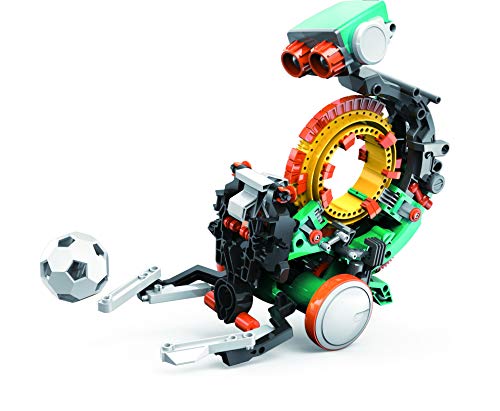
The Mech-5 from Snap Circuits emphasizes a unique mechanical coding experience. This mission-based, entry-level robot is designed to inspire young engineers to learn the basics of coding alongside mechanical principles. Students snap coding buttons onto a Coding wheel to trigger actions, such as throwing, lifting, kicking, and drawing. The module-focused design supports project-based learning and helps a 12-year-old see the connection between software instructions and physical motion. The kit’s approachable assembly and tangible tasks aim to build confidence before transitioning to more complex programming environments.
Educational Value: The Mech-5 blends hands-on construction with simple coding concepts, reinforcing cause-and-effect, sequencing, and debugging. It’s particularly suitable for learners who prefer tactile tasks and clear, physical outcomes from their code. While the complexity remains beginner-friendly, older students can extend activities by introducing basic logic or timing controls within the available actions.
What to Expect: A compact system that centers on mechanical actions rather than advanced AI. Its strength lies in making coding concrete through visible results, which can be motivating for a 12-year-old exploring STEM topics. Assembly is straightforward, with emphasis on experimentation and incremental learning rather than screen time.
Makeblock mBot

The mBot is a versatile entry-level coding robot kit designed to teach electronics, robotics, and computer programming. It bridges Scratch-based coding to Arduino, making it a strong choice for a 12-year-old ready to progress from block-based to text-based coding. With clear building instructions, the kit can be assembled in roughly 15 minutes, and it supports a range of functions like line-following and obstacle avoidance. The mBot ecosystem includes tutorials, coding cards, and free software, with companion apps that support remote control, game-style coding, and project-based learning.
Educational Value: The mBot emphasizes practical understanding of sensors, motors, and control logic. Kids can start with drag-and-drop Scratch and transition toward Arduino coding, aligning well with common curriculums. The learning curve is gentle but scalable, letting learners build confidence through guided projects and increasingly complex tasks as their skills grow.
What to Expect: A well-documented platform with abundant community resources. While batteries are required for full play, the kit’s modular nature makes it easy to expand with additional sensors or modules. It’s an excellent long-term option for a kid aiming to evolve from basic coding to more advanced robotics concepts.
Demkia 5in1 STEM Robot Kit

The Demkia 5in1 STEM Robot Kit offers a 560-piece build experience with five different models, including a robot, tank, and bulldozer. This kit is designed to fuel hands-on engineering creativity, especially for ages 8-12. Its realistic features—such as a flexible left arm and rotating turret—provide engaging play that translates into learning opportunities about mechanisms and motion. The kit supports both remote control and app-based control, enabling students to test scenarios indoors or outdoors and to compare outcomes across different control methods.
Educational Value: By presenting multiple configurations within a single package, Demkia fosters flexible thinking and problem-solving. The blend of manual assembly with remote/app control helps reinforce concepts like gear ratios, torque, and motion planning. It also introduces kids to the idea of choosing appropriate interfaces for different tasks, an important consideration in real-world robotics projects.
What to Expect: A large, feature-rich kit that suits curious learners who enjoy variety. The breadth of models allows students to explore different robotics domains—from locomotion to manipulation—while practicing essential troubleshooting and iterative design.
Makeblock mBot2 Coding Robot

The mBot2 is designed for kids who want to explore AI-enabled coding. It supports Scratch and Python, offering a path from beginner projects to more advanced AI-oriented tasks. The kit includes a step-by-step guide and supports multiple control modes via an app, including Bluetooth and Wi-Fi, enabling flexible playtime. With up to five hours of play on a single charge, it encourages extended experimentation. The platform provides coding project cards and a robust curriculum that helps learners build a solid foundation in robotics, computer science, and data handling.
Educational Value: The mBot2 emphasizes a gradual transition into more sophisticated programming concepts, including AI challenges. It is especially suitable for learners who want to experiment with real-world coding scenarios while staying within a highly accessible environment. This balance makes mBot2 a strong option for a 12-year-old aiming to blend creative projects with practical programming skills.
Makeblock mBot Robot Kit with Scratch Coding Box

The Makeblock mBot Robot Kit with Scratch Coding Box presents a streamlined path to learning coding through four programming projects. It emphasizes a hands-on approach with line-following and obstacle-avoidance activities, plus remote control projects. The kit is designed to be accessible for beginners while offering meaningful challenges to keep a 12-year-old engaged. The included Scratch-based projects help students understand logic sequences, variables, and simple robotics control, and the kit’s focus on beginner-friendly tasks makes it a reliable starter kit for building confidence in coding and hardware.
Educational Value: This kit stands out for its emphasis on immediate, tangible outcomes from coding projects. The project-based structure supports independent exploration, classroom-style learning, or collaborative challenges at home. As skills grow, students can transition to more advanced platforms like Arduino or Python-based robotics, using the same Makeblock ecosystem.
Buying Guide: Key Purchase Considerations
- Age and skill level: Choose kits that align with a 12-year-old’s current abilities but offer room to grow into more advanced concepts like Arduino, Python, or AI-related tasks.
- Project variety vs. focus: Some sets emphasize multiple models and remote control, while others focus on steady progression in coding through a single platform. Consider a balance that matches the learner’s interests.
- Programming path: Look for kits with a clear transition path from block-based coding to text-based languages, as well as robust software support and learning resources.
- Hardware complexity: Ensure the kit’s assembly and sensors won’t be overwhelmingly difficult, but still present meaningful challenges to sustain curiosity.
- Expandability: Kits that support additional sensors, modules, or future upgrades provide longer-term value as skills advance.
- Platform ecosystem: Some brands offer comprehensive tutorials, community examples, and teacher or parent guides; these resources can accelerate learning and troubleshooting.
- Hands-on vs. screen time: A blend of physical building and digital coding keeps engagement high. Consider how much screen time your child is comfortable with and how the kit balances both.
- Durability and safety: Look for solid construction and safe, age-appropriate hardware, particularly for younger builders or beginners.
In sum, the five options highlighted above provide varied pathways into coding and robotics for a 12-year-old. Whether your child prefers mechanical action, AI-assisted play, or Scratch-to-Python progression, these kits offer structured learning, tangible results, and the opportunity to grow alongside increasingly complex projects. Choosing a kit that aligns with your child’s interests and a desire to explore both hardware and software will help sustain motivation and curiosity over time.