Best Light-Up Piano Keyboards for Beginners: Learn Fast
For aspiring musicians, light-up keys can turn practice into a guided, engaging experience. This article highlights five beginner-friendly 61-key keyboards with illuminated keys, built-in teaching modes, and essential accessories to support learning. Each option below includes core features to help you compare at a glance and decide which setup fits your goals, space, and budget.
| Product | Key Feature |
|---|---|
| Best Choice Products 61-Key Beginners Complete Electronic Keyboard | Lighted keys, 61 keys, teaching modes, bundles with stand and bench |
| JIKADA 61 Key Portable Electronic Keyboard | Lighted keys, 61 keys, teaching modes, mic input, memory function |
| RockJam 61-Key Keyboard Kit | Lighted keys, stand, stool, lessons, multiple teaching features |
| The ONE Smart Keyboard COLOR 61 | LED guidance, 256 tones, app connectivity, built-in apps |
| MUSTAR 61-Key Keyboard Set | Lighted keys, chords and teaching modes, complete set with accessories |
Best Choice Products 61-Key Beginners Complete Keyboard Kit
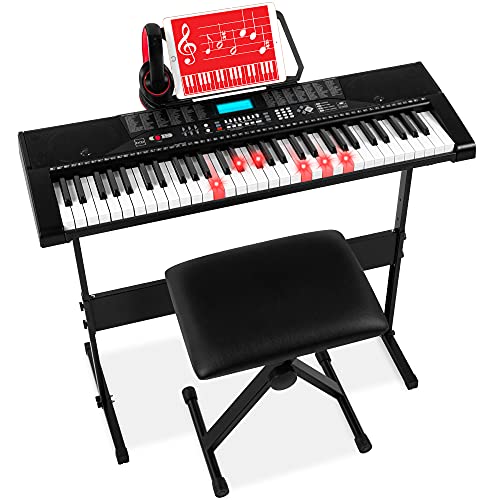
The Best Choice Products 61-Key Beginners Complete Electronic Keyboard Piano Set combines a full teaching bundle with a professional-looking instrument. It includes 61 keys, 255 timbres, 255 rhythms, 50 demo songs, and 32 keyboard percussion types, along with a starting tempo of 120 BPM. The kit’s standout feature is the lighted keys, which illuminate to guide finger placement during lessons. In addition, an LCD display provides immediate feedback, while note stickers and a built-in recorder support early music literacy. The included H-style keyboard stand, music stand, and padded stool create a ready-to-practice setup for homes, classrooms, or dorms. Teaching modes—One-Key, Follow, and Ensemble—offer structured practice sessions for novices.
Designed for beginners who benefit from visual cues, this bundle helps users learn note positions and rhythm recognition without external guidance. The built-in speakers provide a practical, all-in-one solution, and the inclusion of headphones enables quiet practice when needed. For households seeking a comprehensive starter package, this model blends accessibility with classroom-ready features in a single purchase.
JIKADA 61 Key Portable Electronic Keyboard With Lighted Keys

The JIKADA 61-key keyboard emphasizes portability and connectivity without sacrificing teaching features. The true full-size keyboard supports 61 keys with light-up keys to aid beginners in learning sequences. An LCD display clearly shows function status, while a variety of ports—including audio input/output and a microphone jack—allow users to practice singing or speaking while playing. The built-in speakers deliver 255 tones, 255 rhythms, and 61 percussion types, complemented by 50 demo songs for guided practice. Three teaching modes help learners progress step by step, and piano note stickers reinforce visual learning of key positions. A memory function preserves tones, rhythms, and tempo for quick practice shifts.
Key pros include robust audio options for late-night practice, recallable settings for quick sessions, and a layout that supports both solo instrument play and vocal accompaniment. The included accessories encourage a shared practice environment, making this an attractive option for families or classrooms focusing on steady, instructor-grade progression at home.
RockJam 61-Key Keyboard Kit With Stand And Lessons
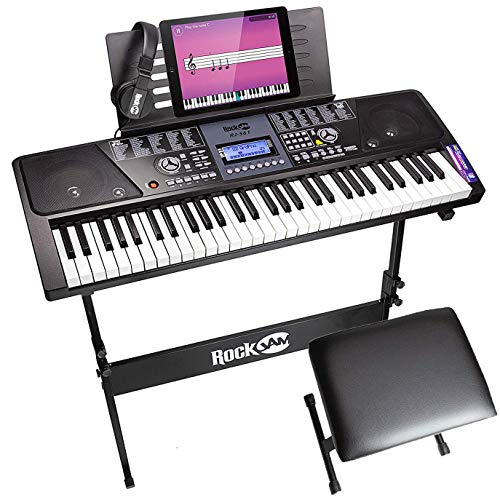
The RockJam 61-Key Keyboard Kit positions itself as a complete beginner solution with a durable 61-key piano, included stand, stool, and headphones. The keyboard itself features a dynamic LCD display and access to 100 rhythms, 50 tones, teaching functions, and 30 demo songs. The kit emphasizes practice versatility, offering recording and playback capabilities to layer performances and review progress. The presence of teaching functions supports progressive learning, while the bundled accessories provide a physical, ready-to-use workstation. For learners who want an introduction to performance workflow—arranging, recording, and listening back—this model offers a practical balance of features and value.
Consider this option if you want a budget-friendly, all-in-one setup that mirrors a stage-ready workflow. Its emphasis on teaching features and record-and-playback can accelerate fundamentals like timing, rhythm accuracy, and tonal variety in early practice sessions.
The ONE Smart Keyboard COLOR 61 With Lighted Keys

The ONE Smart Keyboard COLOR 61 focuses on an interactive learning experience through built-in LED guidance and app integration. With 256 timbres and 64-note polyphony across 61 full-sized keys, it supports a broad sonic palette for beginners exploring different styles. The built-in red LED lights guide playing patterns, and the accompanying apps supply access to more than 4,000 sheet music pieces, 100 instructional videos, and learning games. USB MIDI compatibility and headphones support enable quiet practice and external connections. Sound is derived from a grand piano-inspired source for a realistic feel, while app-enabled features help learners track progress and adjust settings across sessions.
Ideal for tech-savvy beginners who want structured, app-driven lessons and a wide tonal range. The smartphone/tablet app ecosystem can complement formal lessons, making this a compelling option for self-directed learners who appreciate visual feedback and gamified practice.
MUSTAR 61-Key Keyboard With Lighted Keys And Learning Modes

The MUSTAR 61-key learning keyboard combines lighted keys with a comprehensive teaching suite. It includes 3 intelligent teaching modes—One Key, Follow, and Ensemble—designed to guide beginners through each step of learning. The keyboard ships with 21 demo songs, 300 timbres, and 300 rhythms, along with two built-in stereo speakers to deliver convincing sound. In addition to traditional playing, the unit supports single-finger and fingered auto-bass chords, with options to adjust timbre, rhythm programming, and various effects like transpose and vibrato. The included microphone allows singing with accompaniment, and note stickers support visual learning. A portable form factor and power options (adapter or battery) enhance versatility for home, classroom, or outdoor practice.
For learners who want a robust feature set in a single package that travels well, this MUSTAR configuration offers clear, guided pathways from beginners to more confident playing, supported by a broad sonic palette and practical on-the-go power options.
61 Key Piano Keyboard With Light-Up Keys And Smart Features
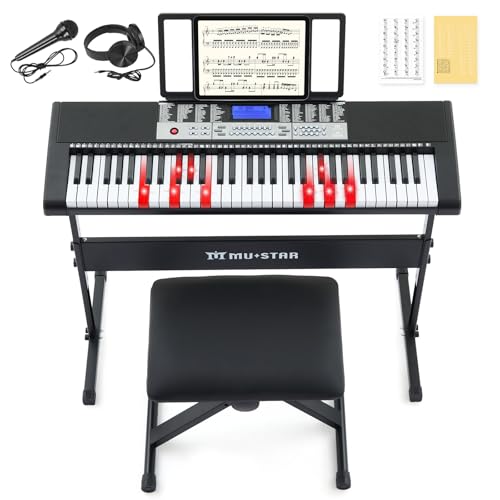
This MUSTAR model emphasizes a smart learning system along with light-up keys that illuminate to guide finger placement. It delivers 255 tones and rhythms, two built-in speakers for robust sound, and 50 demo songs to support structured practice. A three-step learning system—Single Key, Follow, and Ensemble—helps learners advance at a comfortable pace while saving progress in memory slots. The keyboard supports recording and playback, stackable learning modes, and a headphone jack for quiet sessions. Accessories like a stand, stool, and stickers are included in similar MUSTAR bundles, enabling a ready-to-practice environment in a single purchase.
Suitable for beginners who prefer a guided, interactive approach with a strong emphasis on building muscle memory and rhythm through illuminated keys and staged learning steps. Its balance of features and portability makes it a versatile option for home practice or classroom use.
Buying Guide: Key Purchase Considerations For Light-Up Keyboards
When choosing a light-up keyboard for beginners, consider how the instrument will fit into your learning style, space, and long-term goals. The following factors help distinguish entry-level sets from more advanced options.
- Learning features: Look for teaching modes (One-Key, Follow, Ensemble) and light-guided keys. These elements support gradual skill development and reading fluency.
- Key size and feel: A full-size 61-key keyboard is standard for beginners, with keys designed to resemble a piano’s action. Some models emphasize weighted or semi-weighted keys for closer realism; others prioritize portability.
- Tones and rhythms: A broad catalog (hundreds of tones and rhythms) enables exploration of genres while providing a platform for composition and experimentation.
- Connectivity: USB MIDI, audio input/output, and microphone options support singing along, app integration, and external recording. Headphone jacks are essential for quiet practice.
- Learning aids: Note stickers, LED learning guides, and built-in songs help with note recognition and rhythm training. Memory presets can store preferred settings for quick practice.
- Bundle contents: Many beginner kits include stands, stools, and cases. If you already own gear, you may prioritize a compact model or a standalone keyboard only.
- Power options: Check whether the device runs on USB power, an AC adapter, or batteries. Portability often depends on this choice.
- Durability and warranty: For younger players or shared spaces, choose a sturdy kit with dependable customer support and warranty terms.
Choosing the right beginner keyboard depends on whether you value an all-in-one practice station, a highly portable setup, or app-driven guided lessons. Consider how often you practice, the learning environment (home, school, or travel), and whether you plan to expand into performance or recording. If you prefer a classroom-like progression with built-in activities, prioritize models with robust teaching modes and a broad sound library. If you want to explore music production alongside playing, a model with USB MIDI and app connectivity may be more suitable. Finally, assess the total package: is the bundled stand, stool, and accessories worth the added value for your space and budget?