Best Robot Kits for Ten-Year-Olds: Hands-on STEM Fun
Exploring robotics with kids aged 10 and up can spark curiosity, creativity, and critical thinking. The following five robot kits offer engaging building experiences, introductory coding, and safe, age-appropriate experimentation. Each option supports hands-on learning, from motorized movement to basic programming and problem solving, making them ideal for curious minds and curious families alike.
| Product | Brand | Age Range | Key Benefit |
|---|---|---|---|
| Henoda Robot Toys | Henoda | 8-16 | Multi-mode remote and app control with 468+ pieces |
| Makeblock mBot Kit | Makeblock | 8-12 | Scratch to Arduino coding with easy build |
| Thames & Kosmos Mega Cyborg Hand | Thames & Kosmos | 8-12+ | Hydraulic hand with no motors or batteries |
| STEM 13-in-1 Solar Power Robots | Bottleboom | 8-12 | 13 solar-powered builds with real solar energy |
| ELEGOO UNO R3 Robot Car Kit | ELEGOO | 8-16 | Arduino-based car with diverse modules |
Henoda Robot Toys Kit With APP or Remote
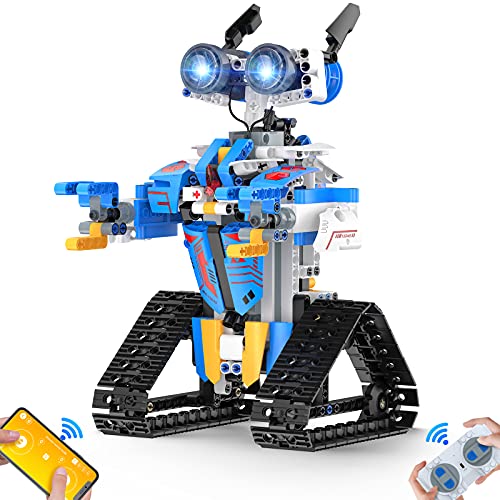
The Henoda kit features 468+ building blocks and glow-eyed, transforming robot figures designed to boost hand-eye coordination, motor skills, and practical abilities. It includes multiple movement modes—left, right, forward, backward, and 360-degree turns—and a remote control option via 2.4 GHz radio, with an app-based Bluetooth control as an alternative. The package encourages open-ended play and STEM exploration, making it a strong entry point for hands-on robotics.
Makeblock mBot Robot Kit

The mBot kit is designed for beginners to learn electronics, robotics, and programming in a hands-on way. It supports Scratch-to-Arduino learning with clear building instructions that enable assembly in minutes. Beyond construction, the robot offers features like line-following and obstacle avoidance, plus remote control via apps and a dedicated controller (batteries not included). These resources help kids build confidence as they transition from simple commands to creative coding projects.
Thames & Kosmos Mega Cyborg Hand

This kit builds a wearable hydraulic hand actuated by air pressure and human input. No motors or batteries are required, which emphasizes pneumatics and mechanical engineering fundamentals. Each finger joint is adjustable, allowing learners to explore precision movement and grasping forces. The project emphasizes engineering concepts through tactile, real-world manipulation, appealing to learners who enjoy hands-on experimentation without complex electronics.
STEM 13-in-1 Solar Power Robots

This 13-in-1 solar robot kit teaches energy science by letting kids build multiple robots powered by solar energy. The kit includes gears, plates, tires, and shafts, with a manual guiding step-by-step builds. Non-toxic ABS materials ensure safety, while the solar power focus reinforces sustainable energy concepts. Children learn problem-solving as they reassemble different configurations to achieve movement under daylight or bright indoor light.
ELEGOO UNO R3 Smart Robot Car Kit

The ELEGOO UNO R3 kit offers an Arduino-based robotics learning experience with 24 modular parts, including line tracing and obstacle avoidance modules. It supports Android and iOS control via smartphone, plus a straightforward assembly process designed to minimize errors. This kit is suitable for learners who want a robust hardware platform, expanding into more advanced electronics and programming as skills grow.
Makeblock mBot Robot Kit With Scratch Coding Box

Another Makeblock option focuses on Scratch coding within a complete box, including four learning projects such as line-following and remote control. The kit emphasizes easy learning curves and visual programming to help kids grasp coding concepts, while still delivering a tangible robot they can manipulate and modify for experiments and creativity.
Teach Tech Mech 5 Mech Coding Robot
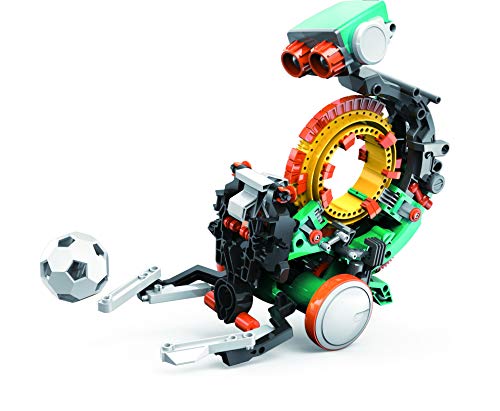
Mech 5 combines mechanical coding with playful missions. The robot supports snapping coding buttons onto a wheel to perform actions such as throwing, lifting, kicking, and drawing. This entry-level mechanical coding robot helps students connect physical manipulation with basic programming concepts, fostering early engineering and problem-solving skills in a tangible way.
Buying Guide: Key Considerations For Purchasing Robot Kits
- Age-appropriateness: Look for kits labeled for ages 8-12 or 10+. Ensure the complexity matches your child’s experience and patience level.
- Learning focus: Decide whether you want entry-level coding (Scratch/Arduino), mechanical engineering, or solar-powered science to balance interests and learning outcomes.
- Programming pathway: Some kits offer step-by-step tutorials and app-based learning, while others emphasize hands-on building with limited software. Consider whether you prefer a visual programming route or a text-based one.
- Build complexity and time: Do you want a quick-build toy to enjoy immediately or a longer-term project that evolves as skills grow? Many kits assemble in under 15 minutes, while others may require longer.
- Expansion opportunities: Kits that support additional modules, upgrades, or open-source software provide room for ongoing learning as skills improve.
- Safety and materials: Non-toxic components, smooth edges, and child-safe plastics are important for younger or more accident-prone users.
- Power sources: Battery types (AA, CR2025, or rechargeable) and the requirement for external power impact ongoing usability and maintenance.
- Support resources: Look for kits with tutorials, project ideas, and community forums, which help with troubleshooting and inspiration.
- Cost vs value: Consider the total number of projects, included parts, and the potential for future purchases to extend learning over time.
- Storage and organization: Larger kits with many pieces benefit from a storage solution to keep components neat and accessible.