Best Tactile Stickers for Visually Impaired: Quick Daily Markings Guide
Accessible design starts with simple, tactile cues. Tactile stickers and bump dots help visually impaired individuals identify keyboards, appliances, controls, and switches by touch. This article highlights five highly suitable options, detailing shapes, colors, and materials to support independent daily living. Each product is evaluated on usability, adhesion, and versatility to cover a range of surfaces and needs.
| Product | Brand | Core Benefit | Surface Compatibility |
|---|---|---|---|
| BLEWAY Bump Dots Combo Pack (165 Pcs) | BLEWAY | Raised tactile dots in multiple shapes and colors for easy identification | Smooth surfaces (keys, devices, switches) |
| 250pcs Bump Dots, Assorted Sizes | Tinoaly | Large quantity with silicone dots for daily accessibility | Smooth surfaces (keys, appliances, switches) |
| BLEWAY Bump Dots 200 Pcs | BLEWAY | Five colors with multiple shapes for customized labeling | Keyboards, controls, household items |
| 245PCS Bump Dots, Assorted Styles | Draupnir | Various shapes for diverse tactile cues | Remote controls, appliances, switches |
| Bump Dots 106pc Combo Pack | GorillaGrit | Mixed shapes and colors for flexible labeling | Home and office devices |
These products are designed to be used on smooth surfaces like glass, plastic, metal, and painted surfaces. The silicone and silicone-like materials provide soft tactile feedback while maintaining durability and reliable adhesion for long-term use. When selecting a pack, consider the color contrast, the range of shapes, and the surface texture to maximize legibility and minimize misidentification.
BLEWAY Bump Dots for Visually Impaired 165 Pcs Combo Pack

The BLEWAY 165-piece set provides tactile hemisphere, cylinder, and square shapes in four vivid colors (yellow, red, black, white), enabling distinct identification across devices and surfaces. Designed for low-vision users, the raised dots support quick touch recognition for keyboards, phones, buttons, and switches. The multi-shape approach lets users tailor their tactile system to personal needs, balancing subtlety and visibility as required.
250pcs Bump Dots for Visually Impaired, Assorted Sizes
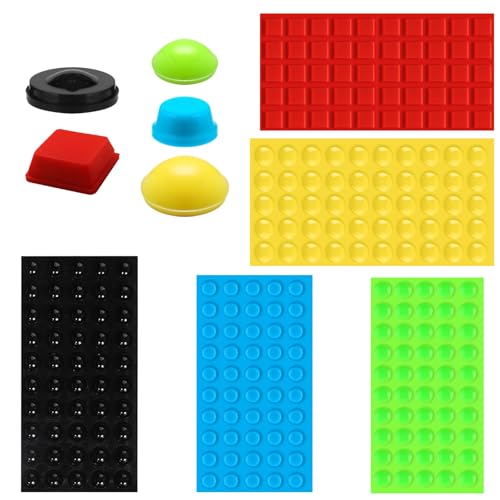
These 250 tactile silicone bump dots offer strong adhesion with a soft touch, suitable for marking keyboards, appliances, and switches. The silicone construction provides durable wear resistance while maintaining comfortable tactile feedback for sensitive users. Peel-and-stick installation makes it easy to create a dependable, long-lasting system for independent living.
BLEWAY Bump Dots for Visually Impaired 200 Pcs

This 200-piece combo provides five colors (yellow, red, blue, purple, green) with unique shapes such as X, L, triangle, rectangle, and circle. The diverse shapes allow users to build a personalized tactile marking system that aligns with their routine items—especially useful for distinguishing multiple controls on devices or keyboards at home or work.
245PCS Bump Dots for Visually Impaired

This set uses varied shapes to aid blind and low-vision users in identifying household controls and devices. The tactile markers are silicone-based, soft to the touch, and designed for smooth surfaces like metal, glass, and plastic. The diverse shapes ensure compatibility with different control layouts, such as remotes and washing machines, enhancing independence.
Bump Dots for Visually Impaired 106pc Combo Pack

GorillaGrit offers a compact 106-piece variety pack featuring multiple shapes and colors to support flexible tactile labeling. This set is suitable for immediate labeling on remotes, keyboards, and common household devices. The mixture of colors and shapes helps users quickly locate frequently used controls by touch, reducing the need for visual confirmation.
Buying Guide
- Color contrast: Choose colors with high contrast relative to the item’s surface for quick recognition, especially in low-light conditions.
- Shape variety: Shapes such as circles, squares, triangles, and hemispheres enable distinct, repeatable tactile cues across different devices.
- Adhesion quality: Look for materials (silicone or soft silicone) with strong self-adhesive backing suitable for smooth surfaces. If the surface is rough, adhesion may decrease.
- Surface compatibility: Confirm the product is designed for smooth surfaces like glass, plastic, metal, and painted finishes commonly found on appliances and electronics.
- Durability and reuse: Durable dots that resist wear and offer reliable adhesion help maintain consistent labeling over time.
- Quantities and kit variety: For households with multiple devices, larger packs with assorted shapes and colors offer better value and flexibility.
- Surface safety: Choose hypoallergenic materials if skin sensitivity is a concern and avoid strong solvents or fragrances that may irritate sensitive users.
- Usage context: Consider whether you need temporary labeling for seasonal devices or a permanent system for daily-use items like keyboards and remotes.
In selecting tactile stickers for visual impairment, balance tactile feedback, color contrast, adhesion strength, and surface compatibility. A mix of shapes, sizes, and colors can create a scalable labeling system that improves independence and daily efficiency.