Best RC Flight Simulators for Realistic Practice and Fun
For hobbyists seeking realistic RC flight training or simply a enjoyable flying experience on a PC, a strong RC flight simulator can be essential. This guide highlights top options, from feature-rich RealFlight titles to versatile cross-platform controllers and classic flight simulators. Each选 provides a blend of real-world aircraft, VR support, and multiplayer options to help you train, compare, and improve your piloting skills.
| Product | Type | Platform | Notes |
|---|---|---|---|
| REALFLIGHT Evolution RC Flight Simulator Software with Interlink DX Controller Included | All-in-one Kit | Windows | Includes InterLink DX; wide aircraft selection |
| RealFlight Evolution RC Flight Simulator Software Only | Software Only | Windows | Robust UI; extensive aircraft and venues |
| STARDRONE S8 RC Flight Simulator Controller (Black) | FPV Drone Controller | Windows, macOS, Android | Broad software compatibility; ergonomic design |
| Airplane RC PRO Flight Simulator | Airplane-focused Simulator | Windows | Runway, water landings, tempest handling |
| FlightGear Flight Simulator 2025 X on USB | Open-World Flight Sim | Windows | 600+ aircraft; 20,000 real-world airports |
The following sections review five top options in detail, outlining what makes them suitable for different types of RC pilots—from beginners to advanced sim racers. Each entry includes a concise feature overview and a practical look at what you can expect during use.
REALFLIGHT Evolution With Interlink DX Controller
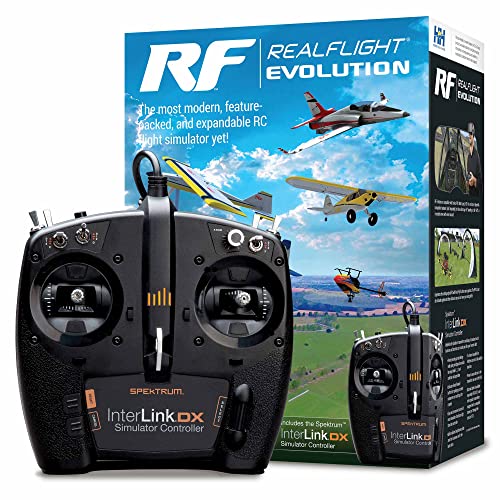
REALFLIGHT Evolution combines a modern user interface with an InterLink DX controller, designed to minimize mouse and keyboard dependence during flight. This kit includes a broad lineup of ultra micro, sport, scale, EDF, and trainer aircraft from popular brands, along with multiple helicopters. The simulator also features a prominent PhotoField venue at Triple Tree Aerodrome for realistic flying sites and community events. It’s ideal for pilots who value hardware integration and a broad aircraft catalog in a single package.
RealFlight Evolution Software Only

This version emphasizes a refined, modern interface that reduces reliance on peripherals. While retaining the same broad aircraft roster and the ability to fly at the famous Joe Nall venue, it’s tailored for users who prefer a clean setup with the InterLink DX as optional hardware. VR headset compatibility adds depth to virtual flight experiences, making it a strong choice for immersive practice and online multiplayer competition.
STARDRONE S8 RC Flight Simulator Controller (Black)

The STARDRONE S8 S8 controller offers an authentic feel with non-centering throttle and ergonomic grip, designed for FPV drone training across popular simulators. It supports a wide array of software including Uncrashed, Liftoff, DRL, RealFlight Evolution, and more. Its versatility across Windows, macOS, and Android devices makes it a practical choice for pilots who want cross-platform training without buying multiple controllers.
STARDRONE S8 RC Flight Simulator Controller (White)

This variant mirrors the Black model’s capabilities, emphasizing cross-platform compatibility and a comfortable, responsive grip. It supports a broad catalog of FPV simulators and is suitable for beginners who want a single controller that works across multiple training ecosystems, as well as experienced pilots who practice with diverse software options.
Airplane RC PRO Flight Simulator
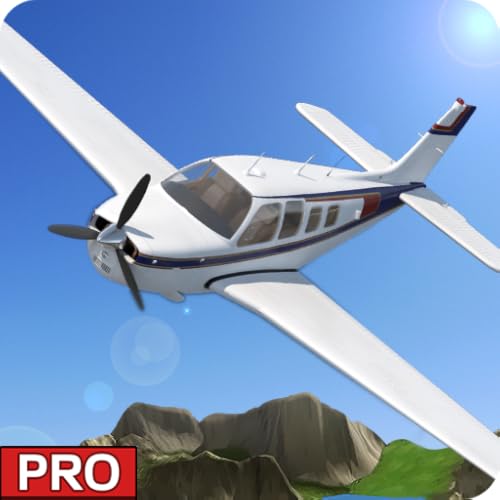
This simulator centers on fixed-wing operations, including takeoffs, landings, and emergency water landings, enabling pilots to practice handling under challenging conditions. It’s a focused option for those who want dedicated airplane flight dynamics and scenario-based training, complementing helicopter and drone sims in a mixed toolkit.
FlightGear Flight Simulator 2025 X on USB

FlightGear is a highly detailed, professional-grade open-source simulator with more than 600 aircraft and 20,000 real-world airports. Delivered on USB for easy setup, it supports a wide range of hardware and is scalable for enthusiasts seeking deep customization and vast global environments. It appeals to serious simulation enthusiasts and those who want to explore routes and terrains beyond conventional RC settings.
Buying Guide: Key Considerations for Choosing an RC Flight Simulator
- Use case and focus: If you want a comprehensive kit with hardware included, RealFlight Evolution with Interlink DX is ideal. For pure software flexibility, RealFlight Evolution Software Only is a strong choice. For FPV drone practice, STARDRONE S8 models offer broad compatibility.
- Hardware compatibility: Check whether the simulator supports your current controller, VR headset, or preferred peripherals. Open formats like FlightGear work well with many setups, but some titles are optimized for specific devices.
- Aerospace catalog and venues: A larger aircraft roster and authentic flying sites (like PhotoField venues) enhance practice realism. Consider whether you want helicopters, micro RCs, scale planes, or EDF jets.
- VR and multiplayer: If immersion and online practice matter, prioritize software with VR support and robust multiplayer options.
- Cross-platform and updates: Some controllers work across Windows, macOS, and Android. Look for ongoing updates and community support, especially with popular titles like RealFlight and STARDRONE.
- Learning curve and UI: Modern UIs reduce setup friction; look for intuitive controls and helpful tutorials to accelerate skill development.
- Budget and upgrades: If cost is a concern, weigh software-only options against bundles, and consider future-proofing with a controller that supports multiple simulators over time.
- Realism versus accessibility: Professional simulators emphasize real flight dynamics and weather, while entry-level options focus on ease of use. Choose based on your training goals and patience for learning curves.