Best Flight Simulator Toys and Setups for Kids: From Circuits to Controllers
Finding engaging, educational flight-themed play and learning tools for kids can blend STEM exploration with hands-on fun. This article highlights five kid-friendly flight simulation products that combine creativity, problem-solving, and pretend-pilot play. Explore kits, beginner controllers, and entry-level software that help young learners understand aerodynamics, electronics, and real-world flight concepts while staying age-appropriate and safe.
| Product | Brand | Type | Key Benefit |
|---|---|---|---|
| Snap Circuits Flight Deck | Snap Circuits | STEM Kit | Hands-on electricity and air concepts with launchable projects |
| FPV Flight Simulator Controller | AIJUNCT | Controller | Beginner-friendly drone simulation training across platforms |
| REALFLIGHT Evolution RC Flight Simulator | REALFLIGHT | Software + InterLink | Modern UI with diverse models and multiplayer options |
| Thrustmaster T-Flight Hotas One | Thrustmaster | Joystick System | Official Microsoft Flight Simulator license compatible setup |
| Thrustmaster TFRP Flight Rudder Pedals | Thrustmaster | Rudder Pedals | Realistic yaw control for precision flight maneuvers |
Snap Circuits Flight Deck Kit

The Flight Deck kit from Snap Circuits combines simple circuit-building with aerodynamics exploration. It includes five unique projects that let kids design circuits to launch paper airplanes, flying saucers, and rolling balls. A spinning wheel creates artistic patterns, while a fan demonstrates how air pressure lifts balls. The kit addresses questions about how planes fly, how electricity works, and how design changes affect behavior. The guided, kid-friendly instructions foster independent exploration and confidence in STEM concepts.
Key features include easy-to-follow directions, independent play, and the potential to combine with other Snap Circuits sets for expanded projects. This makes it a practical STEM gift for curious children who enjoy hands-on experimentation and science-based play.
FPV Flight Simulator Controller

This beginner-friendly 8-channel FPV flight controller is designed for kids and new pilots. It supports professional simulators like DJI Virtual Flight and VelociDrone, offering realistic drone dynamics across micro drones and racing models. The controller emphasizes a safe, plug-and-play experience with broad platform compatibility. It’s a practical entry point for young flyers to practice piloting skills without real-world risk, helping to build coordination and situational awareness through virtual flight practice.
Note: The controller itself does not include FPV simulation games, so users will pair it with compatible software to practice flying. Low-wattage standby power and straightforward USB connection support long practice sessions without battery concerns.
Thrustmaster T-Flight Hotas One

The Thrustmaster T-Flight Hotas One delivers a complete flight-control setup with a 10-bit precision stick and 5 axes, plus 14 buttons and a rapid trigger. It is compatible with Xbox Series X|S and PC, and offers a detachable throttle that makes it convenient for use on a lap or a desk. This product is ideal for kids who want a more mature, authentic flight-simulation feel while remaining approachable through clear, labeled controls and a compact design that’s easy to learn.
Thrustmaster TFRP Rudder Pedals

The TFRP rudder pedals add realistic yaw control to any flight-sim setup. They feature a long travel range for precise maneuvers and a self-centering mechanism to provide accurate, smooth control. These pedals complement joysticks or HOTAS configurations, offering a more immersive piloting experience for kids who are developing fine motor skills and aiming to improve flight accuracy in simulations.
REALFLIGHT Evolution RC Flight Software
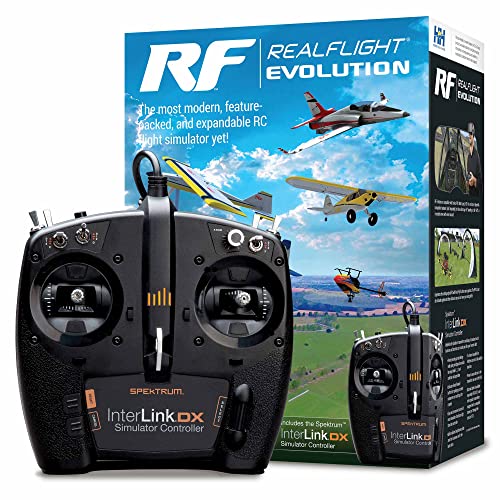
REALFLIGHT Evolution is a comprehensive flight-simulation software that supports a variety of aircraft, including ultra micro, sport, scale, EDF, and trainer models. The package includes an InterLink DX controller for intuitive control and a photo-field flying site for realistic practice. It also offers online multiplayer options, enabling kids to fly with friends. The modern interface aims to reduce the learning curve while expanding the range of aircraft and scenarios available to young pilots.
Flight Simulator Instrument Panel Six Pack

The Flight Simulator Instrument Panel offers operational knobs and buttons for a realistic cockpit feel. It includes software and a built-in monitor, making it a compact, all-in-one system for Windows PCs. Controllers for airspeed, altitude, heading, and attitude provide a hands-on way to explore flight instrumentation. This setup suits kids who crave a tangible, dashboard-like experience while learning core aviation concepts and data interpretation.
Buying Guide: Key Purchase Considerations
- Age and skill level: For younger kids, kits like Snap Circuits offer safe, age-appropriate experimentation, while older children can explore more advanced controllers and software.
- Learning goals: Decide whether the priority is basic aerodynamics, electricity and circuits, or realistic piloting skills and instrument interpretation.
- Hardware vs. software balance: Beginner hands-on kits pair well with entry-level simulators, while advanced learners may benefit from full HOTAS or rudder pedal setups and robust software.
- Platform compatibility: Check that the chosen controller or software works with the child’s computer, console, or mobile devices, as well as any preferred simulator titles.
- Future-proofing: Consider expandable options, such as adding rudder pedals or additional aircraft models, to extend the learning journey over time.
- Safety and supervision: Ensure age-appropriate pieces and establish safe usage guidelines, especially for electronics projects and screen time.
- Budget and value: Weigh the initial cost against potential expansion kits or software subscriptions to maximize long-term educational value.
Overall, these products provide a spectrum of flight-themed educational experiences—from hands-on circuit kits to realistic flight simulation hardware and software. Each option supports curiosity about aerodynamics, piloting, and technology in an age-appropriate way, enabling kids to explore flight concepts in a structured, engaging manner.