Best Coding Robots for Kids: Top Picks for 2026
The following hand-picked coding robots for kids offer screen-free and screen-assisted learning options to build foundational STEM skills. Each item supports early coding concepts, problem solving, and curiosity through hands-on play. Below is a quick overview of five standout choices, followed by detailed sections and a practical buying guide.
| Product | Brand | Core Benefit |
|---|---|---|
| Botley The Coding Robot | Learning Resources | Screen-free coding for ages 5+, 80-step programs |
| mBot Robot Kit | Makeblock | Scratch to Arduino learning with easy build & play |
| Sphero Bolt+ | Sphero | Drag-and-drop to Python/JavaScript with LCD visuals |
| Dash Robot | Wonder Workshop | Voice commands, apps, and classroom-ready activities |
| Code & Go Robot Mouse | Learning Resources | Intro to coding with a responsive robot mouse |
Product Highlights
Botley The Coding Robot

Botley provides screen-free coding exploration suitable for ages 5 and up. It introduces foundational programming concepts through simple remote coding actions, helping kids develop logical thinking and sequencing without tablets or smartphones. The kit supports up to 80-step programs and includes loops and obstacle detection to grow with a child’s skills as they advance. Ready to use out of the box, Botley requires 5 AAA batteries (not included).
Makeblock mBot Robot Kit

mBot is an entry-level coding robot designed for ages 8-12 to learn electronics, robotics, and programming. It supports Scratch and Arduino, with easy-to-follow building instructions that enable quick assembly—typically within 15 minutes. The kit includes remote-control play modes like line-follow and obstacle avoidance, plus rich tutorials for programming. It pairs with Makeblock apps and mBlock software to expand learning, though batteries for the remote and robot (CR2025 and AA) are not included.
Sphero Bolt+ Coding Robot Ball

Sphero Bolt+ delivers a progression from drag-and-drop to text-based coding, including JavaScript and Python. It features an animated LCD screen, real-time data sensors, and a durable, waterproof design. The robot supports coding blocks for hands-on control, with interactive lessons and standards-aligned resources to help integrate programming into broader subjects like math and science.
Wonder Workshop Dash Robot

Dash is a voice-activated, classroom-friendly robot designed for kids aged 6 and up. It offers a seamless introduction to coding concepts like sequencing, loops, and variables through hands-on activities and challenges. Dash is app-enabled with multiple apps available for iOS, Android, and Fire OS, enabling diverse ways to learn and play, whether at home or in the classroom.
Code & Go Robot Mouse
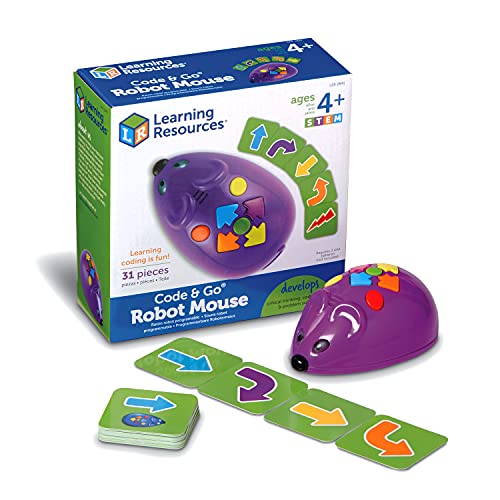
Code & Go Robot Mouse introduces coding with a friendly, responsive mouse that lights up and makes sounds. The system uses pictorial direction coding cards to plan paths and simple push-button controls to program routes. Designed for ages 4 and up, it supports critical thinking, sequential reasoning, and early problem solving, with 3 AAA batteries required (not included).
Buying Guide: Key Considerations For Choosing A Coding Robot For Kids
- Learning style: Screen-free robots emphasize tactile, hands-on learning, while app-enabled models provide text-based coding paths. Choose based on your child’s preference for screens and step-by-step guidance.
- Age and progression: Look for kits with scalable challenges (beginner to advanced) to match a child’s growing skills and sustain interest over time.
- Programming languages: Start with visual block-based coding for beginners, then consider transitions to JavaScript or Python as confidence grows.
- Durability and safety: Durable builds suit younger children. Water resistance or rugged components are beneficial for active play and classrooms.
- Educational value: Choose kits that align with STEM concepts such as sequencing, loops, sensors, and basic robotics principles, plus accessible teacher or parent guides.
- Battery and power: Check battery requirements and the availability of replacement batteries to minimize downtime during learning sessions.
- Compatibility and ecosystem: Some products offer free software updates, lessons, or community projects—an advantage for ongoing learning.
- Price and value: Compare initial costs, included accessories, and the breadth of supported activities to determine long-term value.